Memory Bound

This diagram illustrates the Memory Bound phenomenon in computer systems.

What is Memory Bound?

Memory bound refers to a situation where the overall processing speed of a computer is limited not by the computational power of the CPU, but by the rate at which data can be read from memory.

Main Causes:

  1. Large-scale Data Processing: Vast data volumes cause delays when loading data from storage devices (SSD/HDD) to DRAM
  2. Matrix Operations: Large matrices create delays in fetching data between cache, DRAM, and HBM (High Bandwidth Memory)
  3. Data Copying/Moving: Data transfer waiting times on the memory bus even within DRAM
  4. Cache Misses: When required data isn’t found in L1-L3 caches, causing slow main memory access to DRAM

Result

The Processing Elements (PEs) on the right have high computational capabilities, but the overall system performance is constrained by the slower speed of data retrieval from memory.

Summary:

Memory bound occurs when system performance is limited by memory access speed rather than computational power. This bottleneck commonly arises from large data transfers, cache misses, and memory bandwidth constraints. It represents a critical challenge in modern computing, particularly affecting GPU computing and AI/ML workloads where processing units often wait for data rather than performing calculations.

With Claude

CXL ( Compute express link )

Traditional CPU-GPU vs CXL Key Comparison

🔴 PCIe System Inefficiencies

Separated Memory Architecture

  • Isolated Memory: CPU(DDR4) ↔ GPU(VRAM) completely separated
  • Mandatory Data Copying: CPU Memory → PCIe → GPU Memory → Computation → Result Copy
  • PCIe Bandwidth Bottleneck: Limited to 64GB/s maximum

Major Overheads

  • Memory Copy Latency: Tens of ms to seconds for large data transfers
  • Synchronization Wait: CPU cache flush + GPU synchronization
  • Memory Duplication: Same data stored in both CPU and GPU memory

🟢 CXL Core Improvements

1. Unified Memory Architecture

Before: CPU [Memory] ←PCIe→ [Memory] GPU (Separated)
After: CPU ←CXL→ GPU → Shared Memory Pool (Unified)

2. Zero-Copy & Hardware Cache Coherency

  • Eliminates Memory Copying: Data access through pointer sharing only
  • Automatic Synchronization: CXL controller ensures cache coherency at HW level
  • Real-time Sharing: GPU can immediately access CPU-modified data

3. Performance Improvements

MetricPCIe 4.0CXL 2.0Improvement
Bandwidth64 GB/s128 GB/s2x
Latency1-2μs200-400ns5-10x
Memory CopyRequiredEliminatedComplete Removal

🚀 Practical Benefits

AI/ML: 90% reduction in training data loading time, larger model processing capability
HPC: Real-time large dataset exchange, memory constraint elimination
Cloud: Maximized server resource efficiency through memory pooling


💡 CXL Core Innovations

  1. Zero-Copy Sharing – Eliminates physical data movement
  2. HW-based Coherency – Complete removal of software synchronization overhead
  3. Memory Virtualization – Scalable memory pool beyond physical constraints
  4. Heterogeneous Optimization – Seamless integration of CPU, GPU, FPGA, etc.

The key technical improvements of CXL – Zero-Copy sharing and hardware-based cache coherency – are emphasized as the most revolutionary aspects that fundamentally solve the traditional PCIe bottlenecks.

With Claude

PIM processing-in-memory

This image illustrates the evolution of computing architectures, comparing three major computing paradigms:

1. General Computing (Von Neumann Architecture)

  • Traditional CPU-memory structure
  • CPU and memory are separated, processing complex instructions
  • Data and instructions move between memory and CPU

2. GPU Computing

  • Collaborative structure between CPU and GPU
  • GPU performs simple mathematical operations with massive parallelism
  • Provides high throughput
  • Uses new types of memory specialized for AI computing

3. PIM (Processing-in-Memory)

The core focus of the image, PIM features the following characteristics:

Core Concept:

  • “Simple Computing” approach that performs operations directly within new types of memory
  • Integrated structure of memory and processor

Key Advantages:

  • Data Movement Minimization: Reduces in-memory copy/reordering operations
  • Parallel Data Processing: Parallel processing of matrix/vector operations
  • Repetitive Simple Operations: Optimized for add/multiply/compare operations
  • “Simple Computing”: Efficient operations without complex control logic

PIM is gaining attention as a next-generation computing paradigm that can significantly improve energy efficiency and performance compared to existing architectures, particularly for tasks involving massive repetitive simple operations such as AI/machine learning and big data analytics.

With Claude

OOM Killer

OOM (Out-of-Memory) Killer

This diagram explains the Linux OOM Killer mechanism:

  1. Memory Request Process:
    • A process requests memory allocation from the operating system.
    • It receives a handler for the allocated memory.
  2. Memory Management System:
    • The operating system manages virtual memory.
    • Virtual memory utilizes physical memory and disk swap space.
    • Linux allows memory overcommitment.
  3. OOM Killer Operation:
    • When physical memory becomes scarce, the OOM Killer is initiated.
    • The OOM Killer selects and terminates “less important” processes based on factors such as memory usage and process priority.
    • This mechanism maintains the overall stability of the system.

Linux OOM Killer is a mechanism that automatically activates when physical memory becomes scarce. It maintains system stability by selecting and terminating less important processes based on memory usage and priority.

With Claude

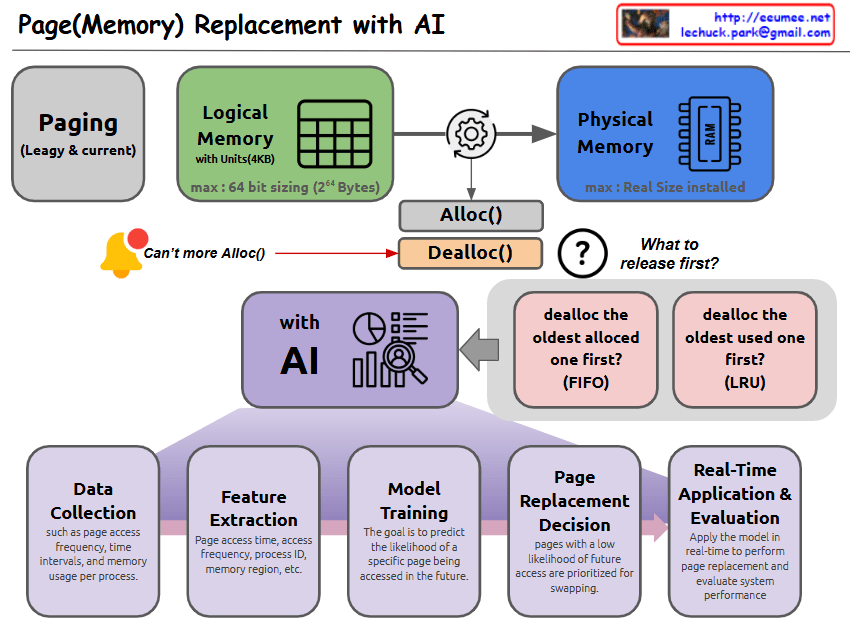
Page(Memory) Replacement with AI

With Claude
This image illustrates a Page (Memory) Replacement system using AI. Let me break down the key components:

  1. Top Structure:
  • Paging (Legacy & current): Basic paging system structure
  • Logical Memory: Organized in 4KB units, maximum 64-bit sizing (2^64 Bytes)
  • Physical Memory: Limited to the actual installed memory size
  1. Memory Allocation:
  • Shows Alloc() and Dealloc() functions
  • When no more allocation is possible, there’s a question about deallocation strategy:
    • FIFO (First In First Out): Deallocate the oldest allocated memory first
    • LRU (Least Recently Used): Deallocate the oldest used memory first
  1. AI-based Page Replacement Process:
  • Data Collection: Gathers information about page access frequency, time intervals, and memory usage patterns
  • Feature Extraction: Analyzes page access time, access frequency, process ID, memory region, etc.
  • Model Training: Aims to predict the likelihood of specific pages being accessed in the future
  • Page Replacement Decision: Pages with a low likelihood of future access are prioritized for swapping
  • Real-Time Application & Evaluation: Applies the model in real-time to perform page replacement and evaluate system performance

This system integrates traditional page replacement algorithms with AI technology to achieve more efficient memory management. The use of AI helps in making more intelligent decisions about which pages to keep in memory and which to swap out, based on learned patterns and predictions.

KASLR(Kernel Address Space Layout Randomization)

With a Claude
this image of KASLR (Kernel Address Space Layout Randomization):

  1. Top Section:
  • Shows the traditional approach where the OS uses a Fixed kernel base memory address
  • Memory addresses are consistently located in the same position
  1. Bottom Section:
  • Demonstrates the KASLR-applied approach
  • The OS uses Randomized kernel base memory addresses
  1. Right Section (Components of Kernel Base Address):
  • “Kernel Region Code”: Area for kernel code
  • “Kernel Stack”: Area for kernel stack
  • “Virtual Memory mapping Area (vmalloc)”: Area for virtual memory mapping
  • “Module Area”: Where kernel modules are loaded
  • “Specific Memory Region”: Other specific memory regions
  1. Booting Time:
  • This is when the base addresses for kernel code, data, heap, stack, etc. are determined

The main purpose of KASLR is to enhance security. By randomizing the kernel’s memory addresses, it makes it more difficult for attackers to predict specific memory locations, thus preventing buffer overflow attacks and other memory-based exploits.

The diagram effectively shows the contrast between:

  • The traditional fixed-address approach (using a wrench symbol)
  • The KASLR approach (using dice to represent randomization)

Both approaches connect to RAM, but KASLR adds an important security layer through address randomization.

MLOCK (LINUX KERNEL)

With a Claude’s Help
this image about Linux mlock (memory locking):

  1. Basic Concept
  • mlock is used to avoid memory swapping
  • It sets special flags on page table entries in specified memory regions
  1. Main Use Cases
  • Real-time Systems
    • Critical for systems where memory access delays are crucial
    • Ensures predictable performance
    • Prevents delays caused by memory pages being moved by swapping
  • Data Integrity
    • Prevents data loss in systems dealing with sensitive data
    • Data written to swap areas can be lost due to unexpected system crashes
  • High Performance Computing
    • Used in environments like large-scale data processing or numerical calculations
    • Pinning to main memory reduces cache misses and improves performance
  1. Implementation Details
  • When memory locations are freed using mlock, they must be explicitly freed by the process
  • The system does not automatically free these pages
  1. Important Note mlock is a very useful tool for improving system performance and stability under certain circumstances. However, users need to consider various factors when using mlock, including:
  • System resource consumption
  • Programme errors
  • Kernel settings

This tool is valuable for system optimization but should be used carefully with consideration of these factors and requirements.

The image presents this information in a clear diagram format, with boxes highlighting each major use case and their specific benefits for system performance and stability.Copy