DNS work sequence

From Claude with some prompting
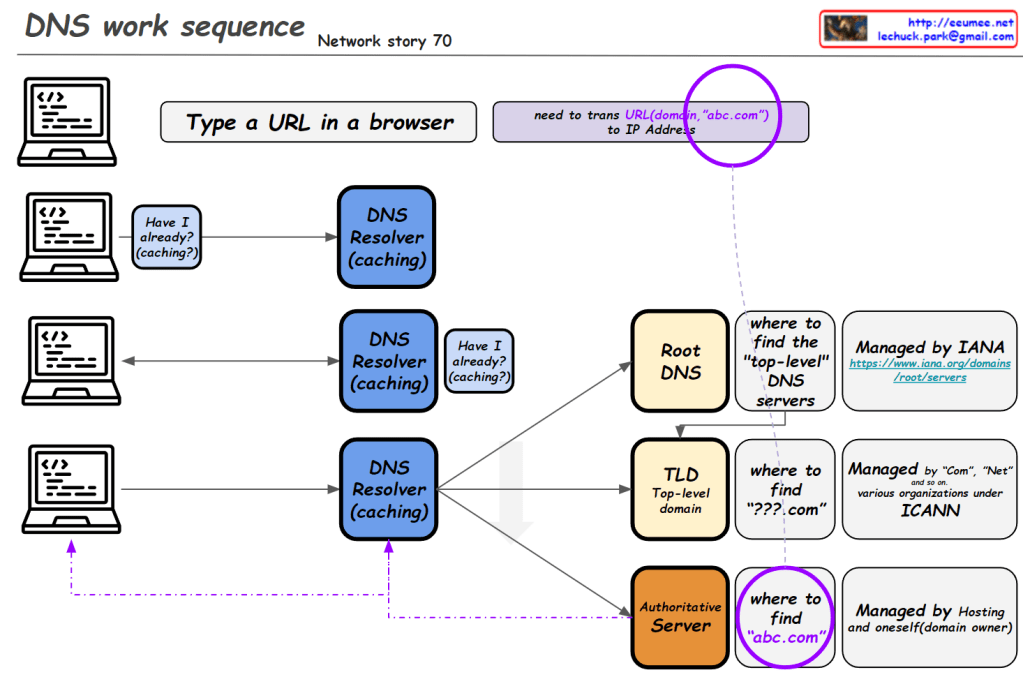
This image illustrates the DNS (Domain Name System) work sequence. Here’s a breakdown:

  1. It starts with typing a URL in a browser. For example, entering “abc.com” requires translation to an IP address.
  2. The DNS resolution process begins, involving multiple levels of DNS resolvers with caching capabilities.
  3. At each level, there’s a “Have I already? (caching?)” check. If the information is cached, it’s used immediately.
  4. If not found, it proceeds to the next level:
    • Root DNS: Provides information on top-level DNS servers (Managed by IANA)
    • TLD (Top-Level Domain): Gives information on domains like “.com” (Managed by various organizations under ICANN)
    • Authoritative Server: Provides actual domain information (e.g., abc.com, managed by hosting providers or domain owners)
  5. Through these stages, the system finds the necessary information to ultimately obtain the IP address of the entered domain.

This diagram effectively demonstrates the hierarchical structure of DNS lookup process and the caching mechanism at each stage.

DNS Why?

From Claude with some prompting
This image is a network diagram explaining the function and importance of DNS (Domain Name System). The main points are:

  1. WWW service works with DNS on TCP/IP.
  2. DNS is responsible for mapping domains to IP addresses.
  3. All network devices on the Internet can only route to IP addresses.
  4. It’s difficult to include actual service characteristics in IP addresses (only by number).
  5. Domain addresses are easy to use and must be mapped to IP addresses.
  6. On the client side, there’s a DNS Resolver (caching).
  7. On the server side, there’s a DNS server, which includes Authoritative Server, Root Server, and TLD Server. These are managed by IANA.
  8. At the center of the diagram is the key question: “So, how does DNS-IP Mapping work?”

This diagram visually explains the working principle of DNS and its importance in the Internet. It emphasizes the crucial role DNS plays in translating user-friendly domain names into IP addresses that computers can understand.

Load balancing with traffic flow

From ChatGPT with some prompting

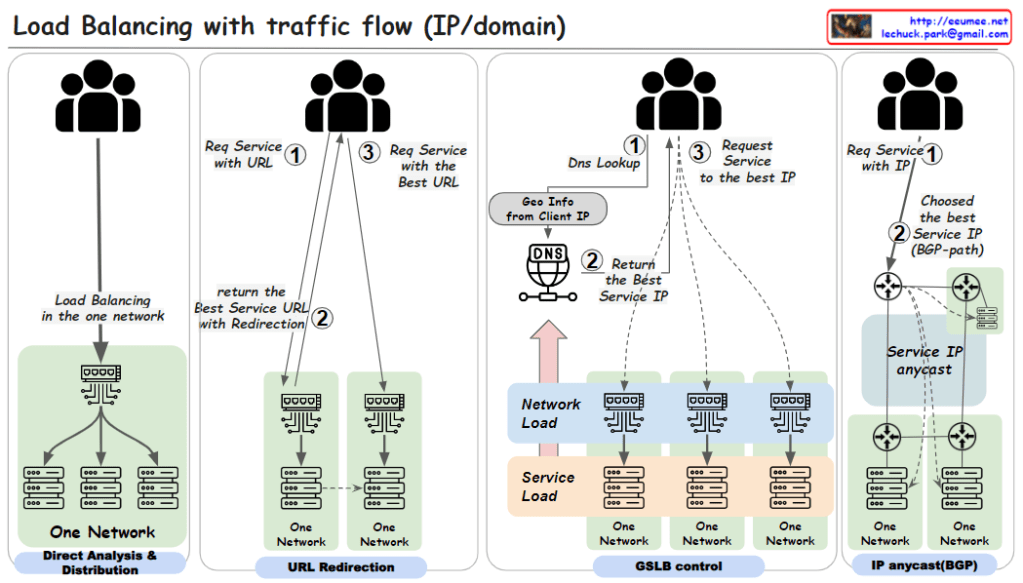
  1. Direct Analysis & Distribution within One Network:
    • This method involves load balancing within a single network using a load balancing switch. The user requests a service via a URL (step 1). The load balancing is handled internally by the switch, which directly analyzes traffic and distributes the load to various servers within the network.
  2. URL Redirection:
    • Here, a user requests a service using a URL (step 1). The network then uses URL redirection to guide the user to the best service URL (step 2), which may involve multiple redirections within one network until the most optimal service endpoint is selected for the user (step 3).
  3. GSLB (Global Server Load Balancing) Control:
    • In this approach, the user starts with a DNS lookup when requesting a service (step 1). The DNS uses the geographic information from the client’s IP to return the best service IP (step 2). The user then requests the service at the given IP address (step 3). This method uses global considerations such as network and service load to balance traffic across multiple networks.
  4. IP Anycast with BGP (Border Gateway Protocol):
    • Users request a service directly using an IP address (step 1). The best service IP is determined via the BGP, which routes traffic based on the shortest available path (step 2). With IP anycast, the user is automatically directed to the nearest or most appropriate service location based on network routing protocols.

Each of these methods is designed to distribute network traffic efficiently. The goal is to ensure service reliability and performance, optimize server use, and improve the overall user experience by reducing latency.