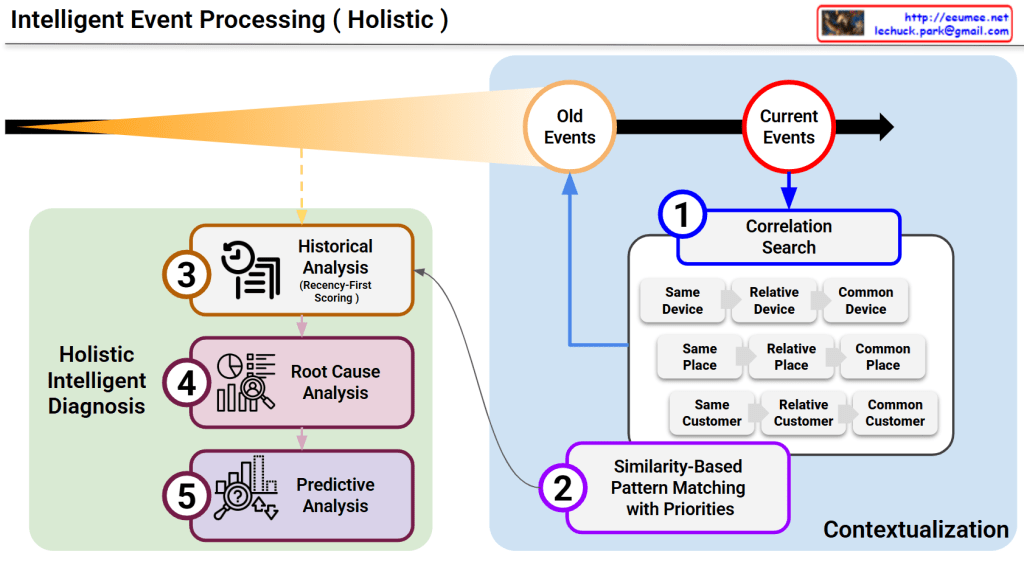
Intelligent Event Analysis Framework ( Holistic Intelligent Diagnosis)

This diagram illustrates a sophisticated framework for Intelligent Event Processing, designed to provide a comprehensive, multi-layered diagnosis of system events. It moves beyond simple alerts by integrating historical context, spatial correlations, and future projections.

1. The Principle of Recency-First Scoring (Top Section)

The orange cone expanding toward the Current Events represents the Time-Decay or Recency-First Scoring model.

  • Weighted Importance: While “Old Events” are maintained for context, the system assigns significantly higher weight to the most recent data.
  • Sensitivity: This ensures the AI remains highly sensitive to emerging trends and immediate anomalies while naturally phasing out obsolete patterns.

2. Multi-Dimensional Correlation Search (Box 1)

When a current event is detected, the system immediately executes a Correlation Search across three primary dimensions to establish a spatial and logical context:

  • Device Context: Investigates if the issue is isolated to the same device, related devices, or common device types.
  • Spatial Context (Place): Analyzes if the event is tied to a specific location, a relative area (e.g., the same rack), or a common facility environment.
  • Customer Context: Checks for patterns across the same customer, relative accounts, or common customer profiles.

3. Similarity-Based Pattern Matching (Box 2)

By combining the results of the Correlation Search with the library of “Old Events,” the system performs Pattern Matching with Priorities.

  • This step identifies historical precedents that most closely resemble the current event’s “fingerprint.”
  • It functions similarly to Case-Based Reasoning (CBR), leveraging past solutions to address present challenges.

4. Holistic Intelligent Diagnosis (Green Box)

This is the core engine where three distinct analytical disciplines converge to create an actionable output:

  • ③ Historical Analysis: Utilizes the recency-weighted scores to understand the evolution of the current issue.
  • ④ Root Cause Analysis (RCA): Drills down into the underlying triggers to identify the “why” behind the event.
  • ⑤ Predictive Analysis: Projects the likely future trajectory of the event, allowing for proactive rather than reactive management.

Summary

For the platform, this diagram serves as the “brain” of the operation. It demonstrates how the agent doesn’t just see a single data point, but rather a “Holistic” picture that connects the dots across time, space, and causality.


#DataCenterOps #AI #EventProcessing #RootCauseAnalysis #PredictiveMaintenance #DataAnalytics #IntelligentDiagnosis #SystemMonitoring #TechInfrastructure

with Gemini

AI GPU Cost

AI GPU Service Cost Proof

This image outlines a framework for justifying the cost of AI GPU services (such as cloud or bare-metal leasing) by strictly proving performance quality. The core theme is “Transparency with Metrics,” demonstrating Stability and Efficiency through data rather than empty promises.

Here is a breakdown of the four key quadrants:

1. Clock Speed Consistency (Top Left)

  • Metric: Stable SM (Streaming Multiprocessor) Clock.
  • Meaning: This tracks the operating frequency of the GPU’s core compute units over time.
  • Significance: The graph should ideally be a flat line. Fluctuations indicate “clock jitter,” which leads to unpredictable training times and inconsistent performance. A stable clock proves the power delivery is clean and the workload is steady.

2. Zero Throttling Events (Top Right)

  • Metric: Count of ‘SW Power Cap’ and ‘Thermal Slowdown’ events.
  • Meaning: It verifies whether the GPU had to forcibly lower its performance (throttle) due to overheating or hitting power limits.
  • Significance: The goal is Zero (0). Any positive number means the infrastructure failed to support the GPU’s maximum potential, wasting the customer’s money and time.

3. Thermal Headroom (Bottom Left)

  • Metric: Temperature Margin (vs. $T_{limit}$).
    • (Note: The text box in the image incorrectly repeats “Streaming Multiprocessor Clock Changes,” likely a copy-paste error, but the gauge clearly indicates Temperature).
  • Meaning: It displays the gap between the current operating temperature and the GPU’s thermal limit.
  • Significance: Operating with a safe margin (headroom) prevents thermal throttling and ensures hardware longevity during long-running AI workloads.

4. Power Draw vs TDP (Bottom Right)

  • Metric: Max Power Utilization vs. Thermal Design Power (TDP).
    • (Note: The text box here also appears to be a copy-paste error from the top right, but the gauge represents Power/Watts).
  • Meaning: It measures how close the actual power consumption is to the GPU’s rated maximum (TDP).
  • Significance: If the power draw is consistently close to the TDP (e.g., 700W), it proves the GPU is being fully utilized. If it’s low despite a heavy workload, it suggests a bottleneck elsewhere (network, CPU, or power delivery issues).

Summary

  1. Objective: To validate service fees by providing transparent, data-driven proof of infrastructure quality.
  2. Key Metrics: Focuses on maintaining Stable Clocks, ensuring Zero Throttling, securing Thermal Headroom, and maximizing Power Utilization.
  3. Value: It acts as a technical SLA (Service Level Agreement), assuring users that the environment allows the GPUs to perform at 100% capacity without degradation.

#AIDataCenter #GPUOptimization #ServiceLevelAgreement #CloudInfrastructure #Nvidia #HighPerformanceComputing #DataCenterOps #GreenComputing #TechTransparency #AIInfrastructure

With Gemini