DNS Why?

From Claude with some prompting
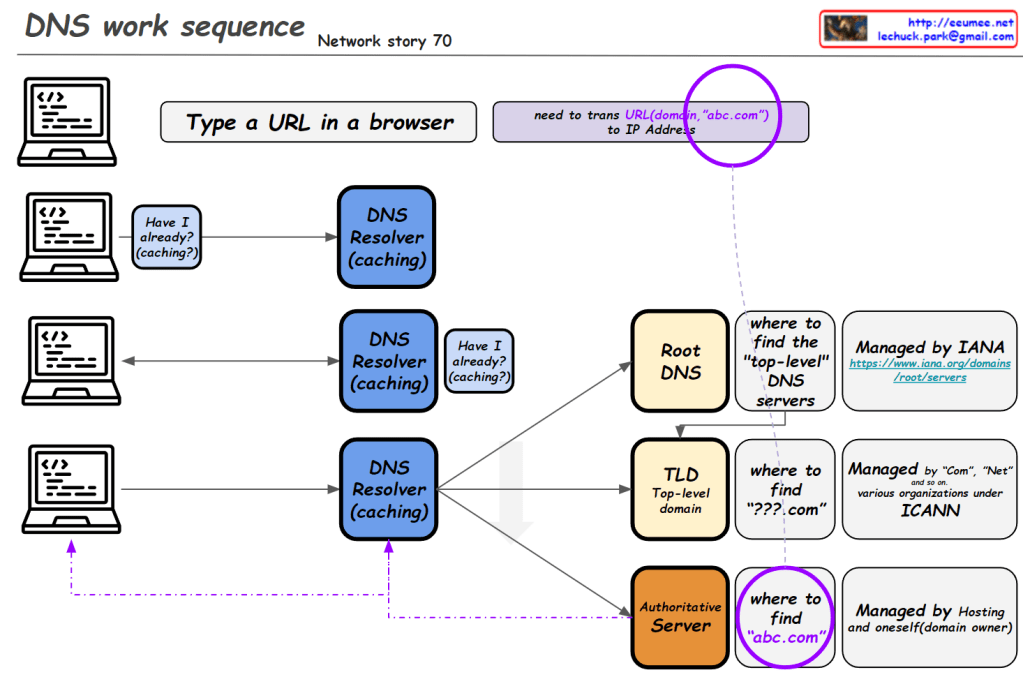
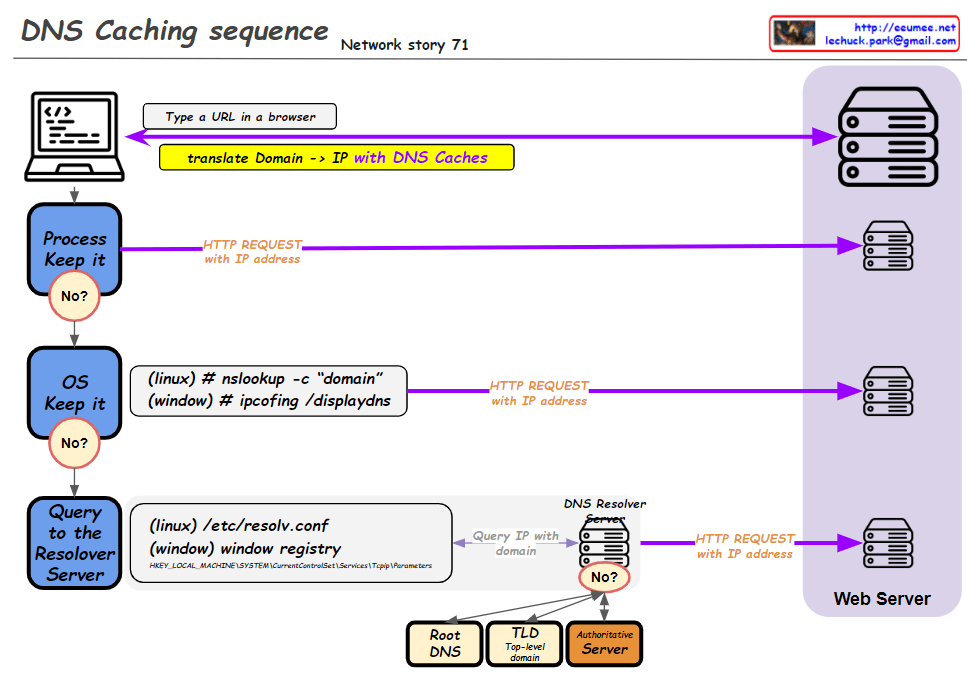
This image is a network diagram explaining the function and importance of DNS (Domain Name System). The main points are:

  1. WWW service works with DNS on TCP/IP.
  2. DNS is responsible for mapping domains to IP addresses.
  3. All network devices on the Internet can only route to IP addresses.
  4. It’s difficult to include actual service characteristics in IP addresses (only by number).
  5. Domain addresses are easy to use and must be mapped to IP addresses.
  6. On the client side, there’s a DNS Resolver (caching).
  7. On the server side, there’s a DNS server, which includes Authoritative Server, Root Server, and TLD Server. These are managed by IANA.
  8. At the center of the diagram is the key question: “So, how does DNS-IP Mapping work?”

This diagram visually explains the working principle of DNS and its importance in the Internet. It emphasizes the crucial role DNS plays in translating user-friendly domain names into IP addresses that computers can understand.

For the Same Traffic metering

From Claude with some prompting
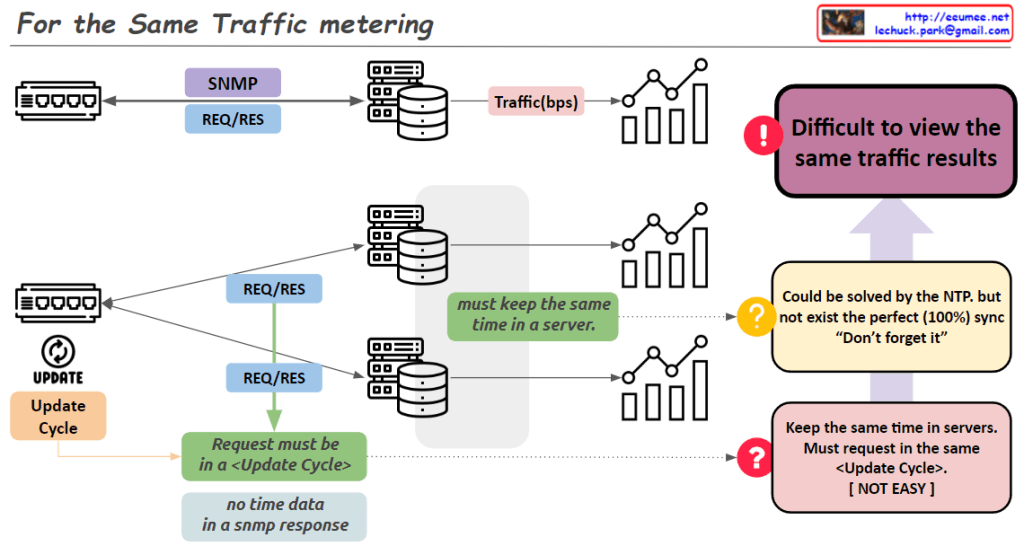
“For the Same Traffic Metering” – Key Points:

  1. Problem: Different collection servers using SNMP may not yield the same results for identical traffic.
  2. Main causes of discrepancy:
    • Network equipment updates traffic information periodically.
    • To get consistent values, SNMP requests must align with the equipment’s update cycle.
    • Difficult to synchronize requests precisely across multiple servers.
  3. Challenges for resolution:
    • Servers need accurate time synchronization.
    • All requests should occur within the same ‘Update Cycle’ of the equipment.
  4. Time synchronization:
    • NTP can partially solve the issue.
    • Perfect (100%) synchronization is not achievable in practice.
  5. Consequence: SNMP data collected from multiple servers may show different results for the same traffic.
  6. Key insight: The image emphasizes the difficulties in accurate data collection using SNMP in network monitoring systems.
  7. Implications: Network administrators and system designers must be aware of these limitations and consider them when collecting and interpreting data.

This summary highlights the complexities involved in ensuring consistent traffic metering across multiple collection points in a network environment.

TCP BBR

From ChatGPT with some prompting
Overview of TCP BBR:

  • TCP BBR optimizes network performance using Bottleneck Bandwidth and Round-trip time (RTT).
  • Speed is determined by RTT.
  • Bandwidth is determined by Bottleneck Bandwidth.

Learning Process:

  • Every ACK:
    • Updates the bottleneck bandwidth.
    • Tracks the minimum observed RTT value.
  • Every RTT:
    • Adjusts the sending size (n * MSS) and the pacing rate (the rate at which data is sent).

Sending Size Update:

  • BBR continuously updates the sending size (how many MSS to send) based on the current network conditions.

In summary, TCP BBR learns the network conditions by monitoring the bottleneck bandwidth and RTT, and accordingly adjusts the sending size and pacing rate to optimize data transmission, reducing congestion and improving performance.

Tahoe & Reno

From Claude with some prompting
This image is a diagram explaining the TCP Congestion Control mechanisms, particularly comparing the congestion control algorithms of two TCP versions: Tahoe and Reno.

Key points:

  1. Both algorithms use a Slow Start Threshold (ssthresh) to determine the initial congestion window size.
  2. The congestion window grows exponentially (2^n) at first, then switches to linear growth (+1) once it reaches ssthresh.
  3. Both algorithms reduce the congestion window to 1 and adjust ssthresh to half of the current size upon a timeout.
  4. When receiving 3 duplicate ACKs (3 DUP ACK), both algorithms halve their ssthresh.

Difference:

  • On 3 DUP ACK:
    • Tahoe: Reduces congestion window to 1
    • Reno: Multiplicatively decreases congestion window

There doesn’t appear to be any incorrect information in this image. It accurately shows the key difference between Tahoe and Reno in their response to 3 DUP ACK situations, and correctly explains other aspects of congestion control as well.

Traceroute

From Claude with some prompting
This image explains the concept of “Traceroute: First Send, First Return?” for the traceroute utility in computer networking. Traceroute sends IP packets with increasing Time-to-Live (TTL) values, starting from TTL=1, 2, 3, and so on. When the TTL reaches 0 at a network hop, that hop returns an ICMP (Internet Control Message Protocol) message back to the source.

However, the order in which the response packets are received at the source may differ from the order in which they were sent, primarily due to two reasons:

  1. Generation of ICMP response packets is a CPU task, and it can be delayed due to CPU settings or other processing priorities, causing a delay in the response.
  2. The ICMP response packets can take multiple paths to return to the source, as indicated by the text “Packet replies can use multiple paths” in the image. This means that responses can arrive at different times depending on the route taken.

As a result, when analyzing traceroute results, it is essential to consider not only the TTL sequence to determine the network hops but also factors like response times and paths taken by the responses.

The potential delay in ICMP packet generation by the CPU and the use of multiple return paths can cause the actual response order to differ from the sending order in traceroute.

Understanding that the response order may not strictly follow the sending order due to CPU processing delays and the use of multiple return paths is crucial when interpreting traceroute results.

TCP Reliable 3

From Claude with some prompting
RTT is measured by sending a packet (SEQ=A) and receiving an acknowledgment (ACK), providing insights into network latency. Bandwidth is measured by sending a sequence of packets (SEQ A to Z) and observing the amount of data transferred based on the acknowledgment of the last packet.

This image explains how to measure round-trip time (RTT) and bandwidth utilization to control and optimize TCP (Transmission Control Protocol) communications. The measured metrics are leveraged by various mechanisms to improve the reliability and efficiency of TCP.

These measured metrics are utilized by several mechanisms to enhance TCP performance. TCP Timeout sets appropriate timeout values by considering RTT variation. TIMELY provides delay information to the transport layer based on RTT measurements.

Furthermore, TCP BBR (Bottleneck Bandwidth and Round-trip propagation time) models the bottleneck bandwidth and RTT propagation time to determine the optimal sending rate according to network conditions.

In summary, this image illustrates how measuring RTT and bandwidth serves as the foundation for various mechanisms that improve the reliability and efficiency of the TCP protocol by adapting to real-time network conditions.

TCP Reliable 2

From Claude with some prompting
This image illustrates the flow control and congestion control mechanisms, which are examples of why TCP (Transmission Control Protocol) is considered a reliable protocol.

  1. TCP is a protocol that employs various mechanisms to ensure reliable data transmission.
  2. Flow Control:
    • It uses sequence numbers and acknowledgments to regulate the amount of data transmitted based on the receiver’s buffer size, preventing data loss.
    • This mechanism contributes to TCP’s reliable delivery guarantee.
  3. Congestion Control:
    • It detects network congestion and adjusts the transmission rate to avoid further congestion.
    • This allows TCP to provide stable and efficient data transfer.

Therefore, flow control and congestion control are key factors that enable TCP to be regarded as a reliable transport protocol. Through these mechanisms, TCP prevents data loss, network overload, and ensures stable communication.