UNIX 1969

From Claude with some prompting
The image comprehensively illustrates the structure and major developments of the UNIX operating system, first developed in 1969. The key components and features are as follows:

  • Hardware: The foundation of the system
  • Kernel: The core of the operating system, including process management functions
  • Shell: The interface for users to manage the system
  • Utilities: Tools such as compilers included
  • Daemon: Processes that run in the background
  • C Language and Assembly: Introduced in 1972, the C language was used for system development
  • POSIX (1988): An interface for standardizing UNIX systems, including pipes and filters
  • Multitasking and Time-sharing: Key features of UNIX
  • “All is File” Philosophy: A core design principle of UNIX
  • Networking Advancements:
    • UUCP (1978): An early communication protocol between UNIX systems
    • TCP/IP with Socket API (1983): The foundation of modern networking

This diagram shows the evolution of UNIX from its basic structure to significant technological advancements over time, providing a comprehensive overview of UNIX’s core concepts and features. It displays the historical development of UNIX by combining early design elements with later added functionalities, allowing for a clear understanding of UNIX’s progression.
Kernel Transport Layer Security

From Claude with some prompting
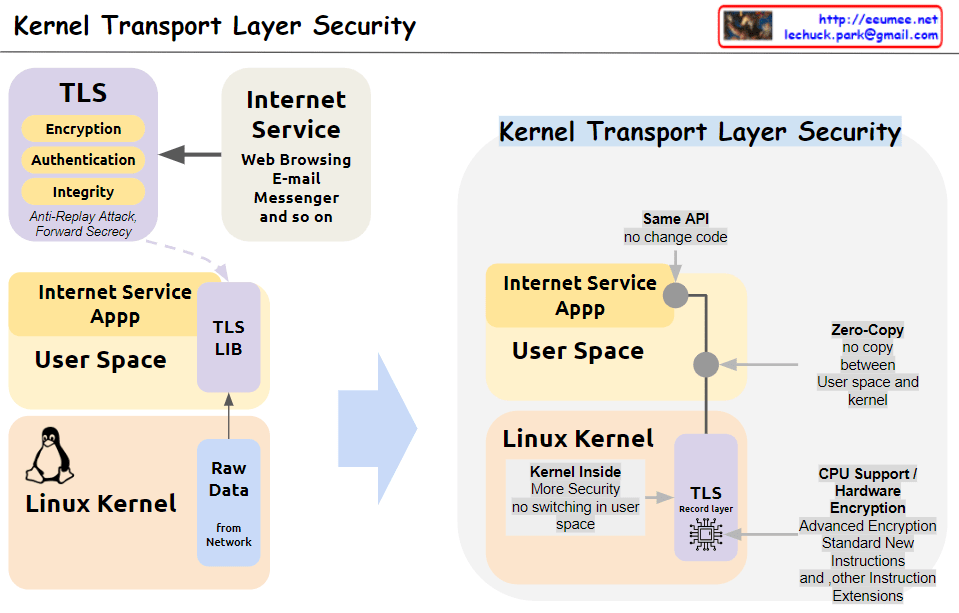
This image illustrates the concept and structure of KTLS (Kernel Transport Layer Security). KTLS implements the TLS protocol within the Linux kernel to improve performance and security.

  1. The core functionalities of TLS (encryption, authentication, integrity, anti-replay attack, and forward secrecy) are handled within the kernel.
  2. Applications for internet services (web browsing, email, messenger, etc.) run in user space and utilize the TLS functionality through the TLS library, while still using the same socket API.
  3. Data copying (Zero-Copy) between user space and kernel space is minimized, enhancing performance.
  4. With the TLS Record Layer operating inside the kernel, context switching to user space is reduced, improving security.
  5. Cryptographic acceleration features of CPUs, such as AES-NI and other encryption instruction extensions, are utilized to boost encryption operation performance.

In summary, by moving TLS processing to the kernel level, KTLS significantly improves both performance and security simultaneously.

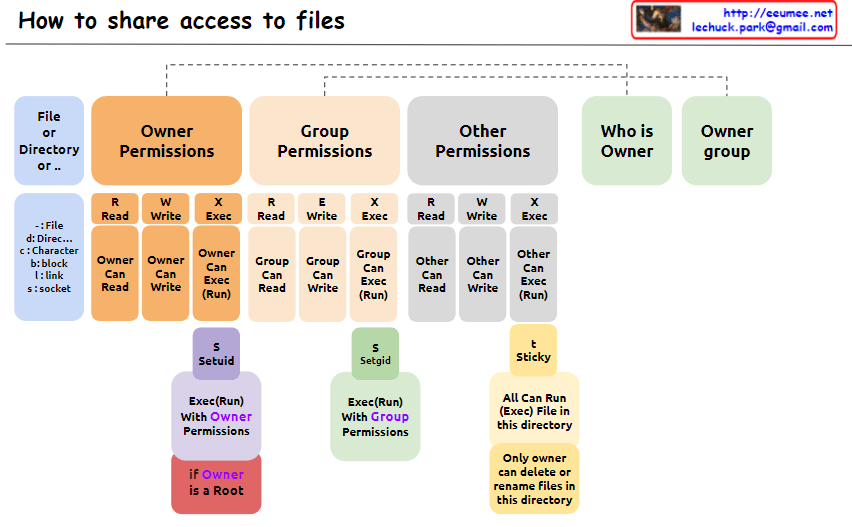
How to share access to files

From Claude with some prompting
The image explains “How to share access to files” in Unix/Linux systems, illustrating the structure of file permissions. The diagram breaks down permissions into owner, group, and other categories, along with special permissions and metadata.

  1. File Permissions Structure: The image depicts how access rights to files or directories are shared in Unix/Linux systems. Permissions are divided into owner, group, and other users.
  2. Owner Permissions:
    • Read (R): Owner can read the file.
    • Write (W): Owner can modify the file.
    • Execute (X): Owner can execute the file.
  3. Group Permissions:
    • Read (R): Group members can read the file.
    • Write (W): Group members can modify the file.
    • Execute (X): Group members can execute the file.
  4. Other Permissions:
    • Read (R): Other users can read the file.
    • Write (W): Other users can modify the file.
    • Execute (X): Other users can execute the file.
  5. Metadata:
    • Who is Owner: Indicates who owns the file or directory.
    • Owner group: Shows which group the file or directory belongs to.
  6. Special Permissions: a. SetUID (S):
    • Executes with the file owner’s permissions.
    • Useful when a regular user runs the passwd command owned by root.
    b. SetGID (S):
    • Executes with the file group’s permissions.
    • Beneficial for group collaboration; new files can inherit the parent directory’s group.
    c. Sticky (T) – Corrected Part:
    • “Only owner can delete or rename files in this directory”
    • When set on a directory, files within it can only be deleted or renamed by the file’s owner, directory owner, or root.
    • Commonly used in shared directories like /tmp to prevent users from unauthorized deletion or renaming of each other’s files.
  7. Additional Information:
    • “if Owner is a Root”: When the owner is the root user, special privileges are granted. Root has all permissions on every file and directory, enabling any system administration task.

This image provides a clear and visual explanation of the file permission system in Unix/Linux. Notably, the description of the Sticky bit has been corrected to accurately reflect its function: “Only owner can delete or rename files in this directory”. This correction properly conveys that while execution and modification of files in a Sticky directory are governed by individual file permissions, the ability to delete or rename files is restricted to the file owner, directory owner, or root.

This permission system effectively manages security and accessibility in multi-user environments. It allows fine-grained control over who can read, write, or execute files, and in the case of the Sticky bit, who can delete or rename files in shared spaces. Such granular control is crucial for maintaining data integrity, privacy, and orderly collaboration among users on a Unix/Linux system.

Interrupt

From Claude with some prompting
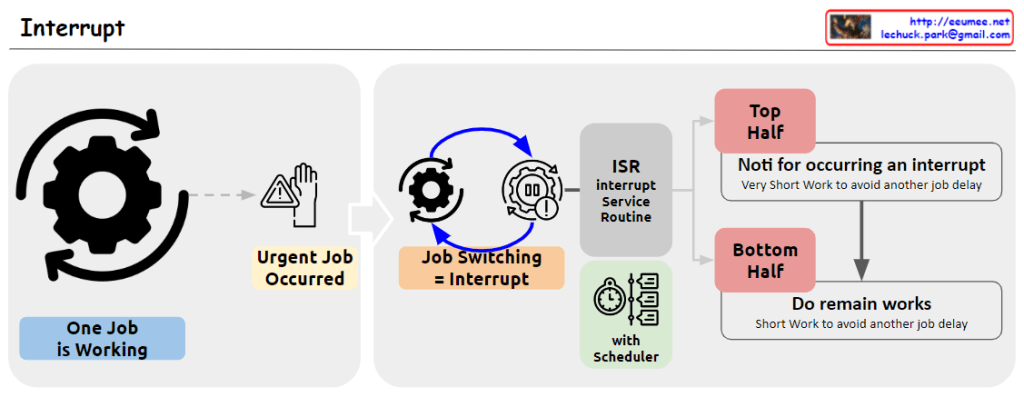
The image illustrates the process of handling interrupts in a computer system. When an urgent job (Urgent Job Occurred) arises while another job (One Job is Working) is executing, an interrupt (Job Switching = Interrupt) occurs. This triggers the Interrupt Service Routine (ISR) to handle the interrupt.
The interrupt handling process is divided into two halves: the Top Half and the Bottom Half. The Top Half performs a “Very Short Work to avoid another job delay” and notifies the system of the interrupt occurrence. The Bottom Half handles the remaining work, also performing “Short Work to avoid another job delay.”

Memory Control Unit

From Claude with some prompting
The image explains the memory management and access approaches in computing systems. Fundamentally, for any memory management approach, whether hardware or software, there needs to be a defined unit of operation.

At the hardware level, the physical Memory Access Unit is determined by the CPU’s bit width (32-bit or 64-bit).

At the software/operating system level, the Paging Unit, typically 4KB, is used for virtual memory management through the paging mechanism.

Building upon these foundational units, additional memory management techniques are employed to handle memory regions of varying sizes:

  • Smaller units: Byte-addressable memory, bit operations, etc.
  • Larger units: SLAB allocation, Buddy System, etc.

Essentially, the existence of well-defined units at the hardware and logical/software layers is a prerequisite that enables comprehensive and scalable memory management. These units serve as the basis for memory control mechanisms across different levels of abstraction and size requirements in computing systems.

Linux with ML

From Claude with some prompting
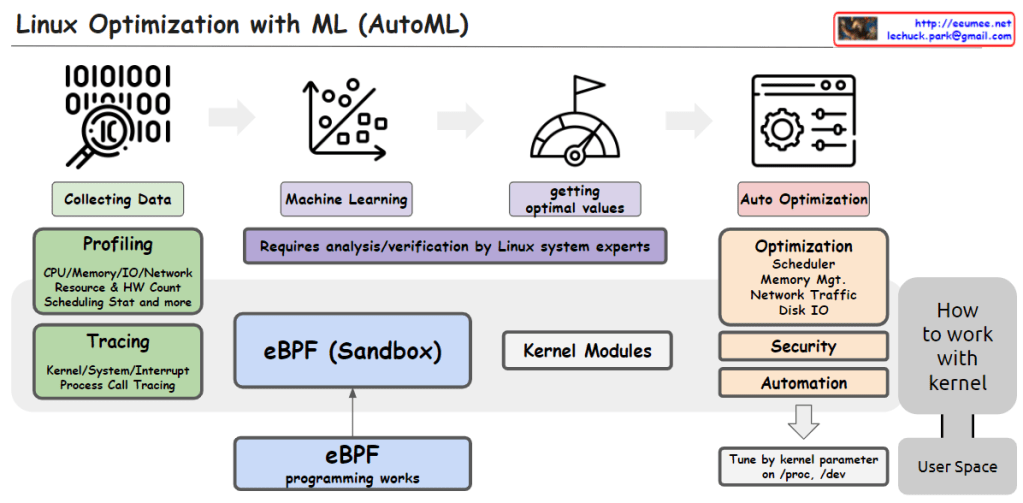
This image illustrates the process of utilizing Machine Learning (ML) and AutoML techniques for system optimization in Linux.

It starts with collecting data through profiling techniques that gather statistics on CPU, memory, I/O, network resource usage, hardware counters, scheduling information, etc. Tracing is also employed to capture kernel/system/interrupt events and process call traces.

The collected data is then used to train machine learning models. This step requires analysis and verification by Linux system experts.

The trained models help determine optimal values, which are then applied to optimize various system components such as the scheduler, memory management, network traffic, and disk I/O. Optimization can also target security and automation aspects.

The eBPF (Enhanced Berkeley Packet Filter) sandbox, situated in the center, allows safe execution within the kernel, enabling eBPF programs to interact with the kernel.

Kernel modules provide another way to implement optimization logic and integrate it directly into the kernel.

Finally, kernel parameters can be tuned from user space to perform optimizations.

In summary, the image depicts an AutoML-based process that leverages data collection, machine learning modeling, deriving optimal values, eBPF, kernel modules, and parameter tuning to automate system optimization in Linux across various kernel subsystems like the scheduler, memory management, network, and disk I/O.C

KASAN @ linux kernel

From Gemini with some prompting
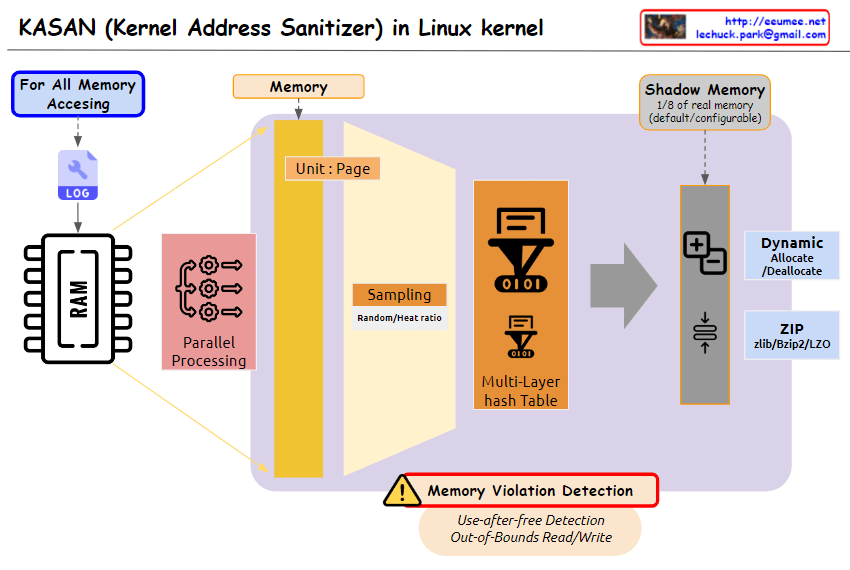
The image you provided depicts a diagram illustrating the operation of Kernel Address Sanitizer (KASAN) in the Linux kernel. KASAN is a memory sanitizer tool that aims to detect memory corruption errors, particularly those related to out-of-bounds reads/writes and use-after-free vulnerabilities.

Key Elements of the Diagram:

  1. Memory Accessing: This section represents the various ways in which memory is accessed within the kernel. It includes both valid and invalid access patterns.
  2. For All Memory: This indicates that KASAN monitors memory accesses for all allocated memory regions, regardless of their purpose or usage.
  3. Shadow Memory: This represents a dedicated memory space, typically 1/8th of the total physical memory, allocated by KASAN to store information about memory accesses.
  4. Violation Detection: This section highlights the core function of KASAN, which is to detect and report invalid memory access attempts.
  5. Use-after-free Detection: This specifically refers to KASAN’s ability to identify attempts to access memory regions that have already been freed, preventing potential memory corruption issues.
  6. Out-of-Bounds Read/Write: This emphasizes KASAN’s capability to detect memory accesses that exceed the boundaries of the allocated memory regions, safeguarding against buffer overflows and other memory-related vulnerabilities.

Overall Interpretation:

The diagram effectively illustrates the fundamental concept of KASAN: monitoring memory accesses, maintaining a shadow memory space for access information, and detecting invalid access patterns to prevent memory corruption errors.