There’s such thing as ‘impossible’.

This infographic illustrates a software development philosophy titled “There’s such thing as ‘impossible’.” It emphasizes that there are real limitations in development:

  1. Development process flow:
    • “Machine Code” (represented by binary digits)
    • “Software Dev” (showing code editor)
    • “Application” (showing mobile interface)
    • Arrow pointing to infinity symbol labeled “Unbounded” with a warning sign
  2. Practical constraints:
    • “Reality has no ∞ button. Choose.” (emphasizing limitations exist)
    • Icons representing people and money (resource management)
    • “Everything requires a load” (showing resources are needed)
    • “Energy” and “Time” with cycling arrows (demonstrating finite resources)
  3. Keys to successful development:
    • Clear problem definition (“Clear Definition”)
    • Setting priorities (“Priorities”)
    • Target goals

The overall message highlights that impossibility does exist in software development due to real-world constraints of time, energy, and resources. It emphasizes the importance of acknowledging these limitations and addressing them through clear problem definition and priority setting for effective development.

With Claude

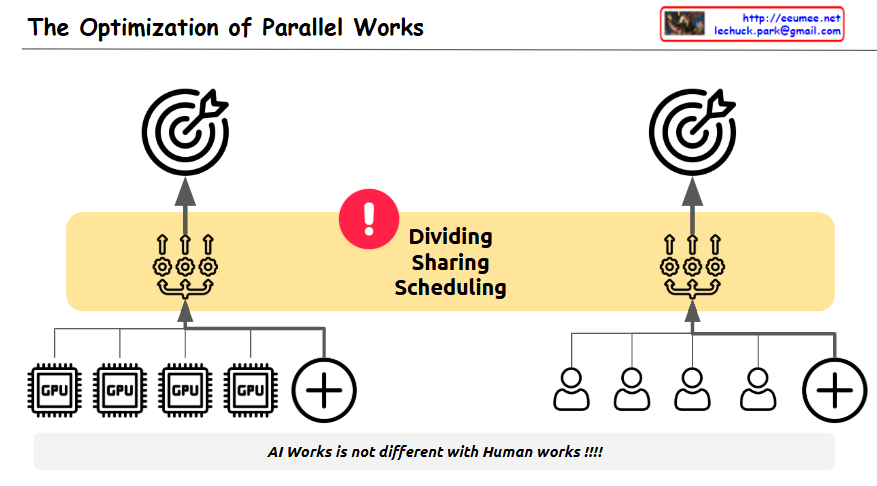
The Optimization of Parallel Works

The image illustrates “The Optimization of Parallel Works,” highlighting the inherent challenges in optimizing parallel processing tasks.

The diagram cleverly compares two parallel systems:

  • Left side: Multiple CPU processors working in parallel
  • Right side: Multiple humans working in parallel

The central yellow band emphasizes three critical challenges in both systems:

  • Dividing (splitting tasks appropriately)
  • Sharing (coordinating resources and information)
  • Scheduling (timing and sequencing activities)

Each side shows a target/goal at the top, representing the shared objective that both computational and human systems strive to achieve.

The exclamation mark in the center draws attention to these challenges, while the message at the bottom states: “AI Works is not different with Human works!!!!” – emphasizing that the difficulties in coordinating independent processors toward a unified goal are similar whether we’re talking about computer processors or human teams.

The diagram effectively conveys that just as it’s difficult for people to work together toward a single objective, optimizing independent parallel processes in computing faces similar coordination challenges – requiring careful attention to division of labor, resource sharing, and timing to achieve optimal results.

With Claude

Operation with system

Key Analysis of Operation Cost Diagram

This diagram illustrates the cost structure of system implementation and operation, highlighting the following key concepts:

  1. High Initial Deployment Cost: At the beginning of a system’s lifecycle, deployment costs are substantial. This represents a one-time investment but requires significant capital.
  2. Perpetual Nature of Operation Costs: Operation costs continue indefinitely as long as the system exists, making them a permanent expense factor.
  3. Components of Operation Cost: Operation costs consist of several key elements:
    • Energy Cost
    • Labor Cost
    • Disability Cost
    • Additional miscellaneous costs (+@)
  4. Role of Automation Systems: As shown on the right side of the diagram, implementing automation systems can significantly reduce operation costs over time.
  5. Timing of Automation Investment: While automation systems also require initial investment during the early phases, they deliver long-term operation cost reduction benefits, ultimately improving the overall cost structure.

This diagram effectively visualizes the relationship between initial costs and long-term operational expenses, as well as the cost optimization strategy through automation.

With Claude