No More data

From Claude with some prompting
This image illustrates a flowchart about data and the learning process. Here’s a breakdown of the key elements:

  1. The title “No More Data” is at the top of the image.
  2. “Data in” section includes:
    • Experience: represented by a history icon
    • Number: shown as dice with 1, 2, 3
    • Text: represented by “IT” letters
    • Book: depicted by a book icon
    • Internet: symbolized by a global network icon
  3. These data sources feed into a “Learning & Learning” process, leading to a learning output represented by an icon resembling artificial intelligence or a brain.
  4. There’s a stage labeled “No More Data”, followed by the question “And the Next ??”
  5. Finally, there’s a lightbulb icon suggesting “New Creation?”

This diagram visualizes the process from data input to learning, and then poses the question of what happens when there’s no more data. It suggests the possibility of new creation as the next step. The flowchart prompts consideration of what follows after the learning phase when data input ceases, and whether this could lead to novel creation.

DC OP Platform

From Claude with some prompting
This image depicts a diagram of the “DC op Platform” (Data Center Operations Platform). The main components are as follows:

  1. On the left, there’s “DC Op Env.” (Data Center Operations Environment), which consists of three main parts:
    • DCIM (Data Center Infrastructure Management)
    • Auto Control
    • Facility These three elements undergo a “Standardization” process.
  2. In the center, there are two “Standardization” server icons, representing the standardization process of the platform.
  3. On the right, there’s the “Data Center Op. Platform”, which comprises three main components:
    • Service Development
    • Integrated operations
    • Server Room Digital Twin
  4. Arrows show how the standardized elements connect to these three main components.

This diagram visually illustrates how the data center operations environment evolves through a standardization process into an integrated data center operations platform.

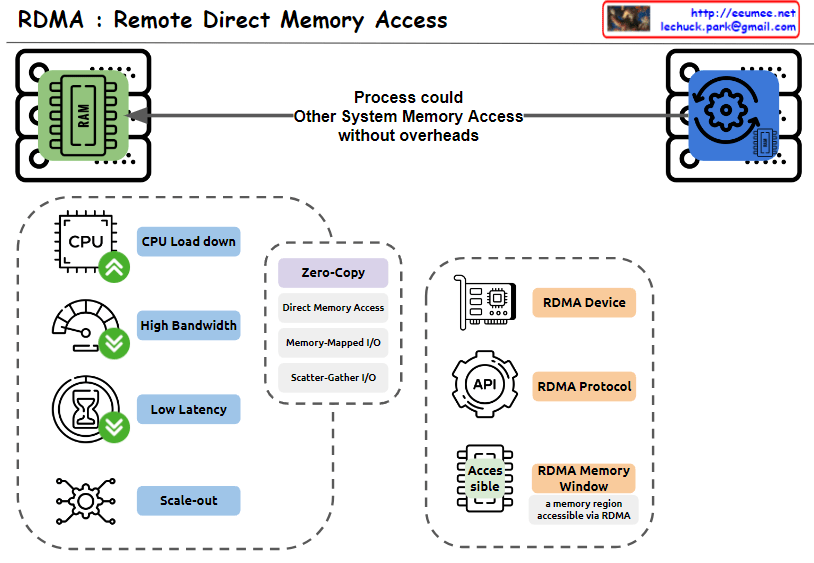
RDMA : Remote Direct Memory Access

From Claude with some prompting
This image explains RDMA (Remote Direct Memory Access). Here’s an interpretation in English:

  1. The top of the image shows that RDMA allows one system to access the memory of another system without overheads.
  2. The bottom left box lists the main advantages of RDMA:
    • CPU Load down
    • High Bandwidth
    • Low Latency
    • Scale-out
  3. The central box describes key features of RDMA:
    • Zero-Copy
    • Direct Memory Access
    • Memory-Mapped I/O
    • Scatter-Gather I/O
  4. The bottom right box lists RDMA-related components:
    • RDMA Device
    • RDMA Protocol
    • RDMA Memory Window (defined as “a memory region accessible via RDMA”)

The image provides a concise overview of RDMA technology, highlighting its main features and benefits. It illustrates how RDMA enables efficient, direct memory access between systems, reducing CPU load and improving performance in terms of bandwidth and latency.

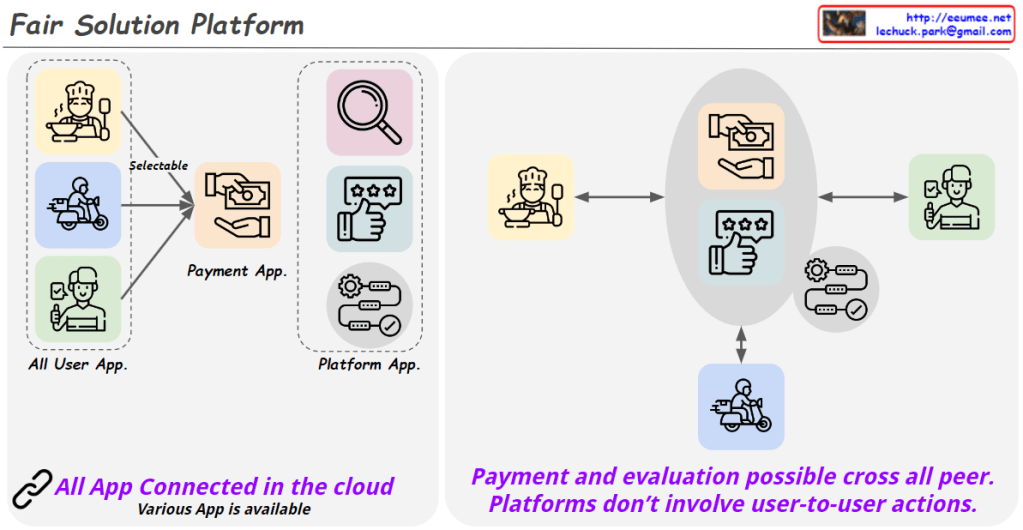
Fair Solution Platform

From Claude with some prompting
The “Fair Solution Platform” is designed with the following key concepts:

  1. User Empowerment:
    • All users (chefs, delivery personnel, customers, etc.) can directly choose which service apps to use for actual interactions (ordering, payment, delivery, evaluation, etc.).
  2. Platform Neutrality:
    • The platform provider does not interfere with direct user-to-user interactions.
    • Instead, it creates an environment where various apps can connect and be provided.
  3. Connectivity and Diversity:
    • All apps are connected through the cloud.
    • The platform fosters an ecosystem where diverse apps can be offered.
  4. Additional Features:
    • Provides functionality to search for services and activity results conducted on the platform.
  5. Fair Cost Structure:
    • The platform only charges fees related to its role as a platform.
    • Terms of transactions between users are decided directly by the parties involved.
  6. User Rights Protection:
    • This model aims to safeguard the rights of actual producers and consumers.
    • It facilitates direct transactions with minimal intermediary intervention.

The platform aims to maximize user autonomy, maintain platform neutrality, and create a fair trading environment. By doing so, it seeks to overcome the limitations of traditional platform models and create a more equitable and efficient service ecosystem.

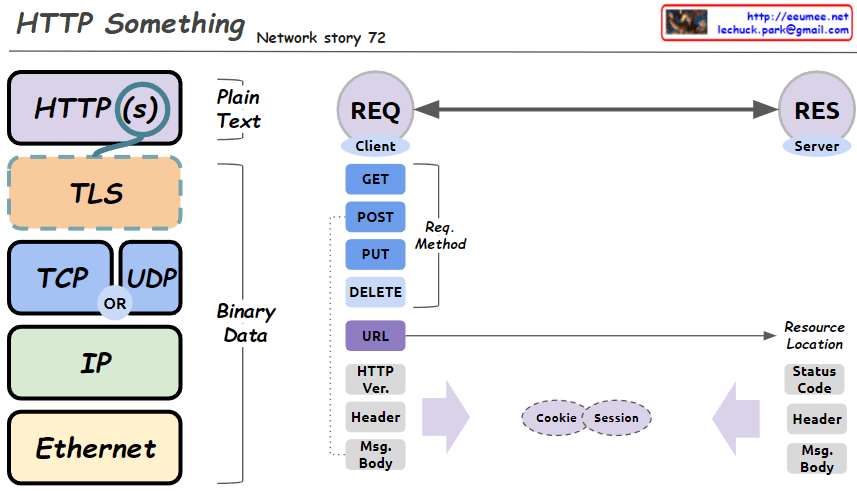
HTTP something

From Claude with some prompting
This image is a diagram explaining the structure of HTTP (Hypertext Transfer Protocol) and related network protocols. The main components are:

  1. Protocol Stack:
    • HTTP(S)
    • TLS (Transport Layer Security)
    • TCP (Transmission Control Protocol) or UDP (User Datagram Protocol)
    • IP (Internet Protocol)
    • Ethernet
  2. Data Types:
    • Plain Text: At HTTP(S) and TLS levels
    • Binary Data: From TCP/UDP down to Ethernet
  3. Communication between Client (REQ) and Server (RES):
    • Request Methods: GET, POST, PUT, DELETE
    • URL (Resource Location)
    • HTTP Version
    • Headers
    • Message Body
  4. Cookies and Sessions: Mechanisms for exchanging information between client and server
  5. Server Response:
    • Status Code
    • Headers
    • Message Body

This diagram provides a simplified view of the basic structure of HTTP requests and responses, as well as the underlying network protocol layers that support them. It visually explains the fundamental principles of web communication.