From Claude with some prompting
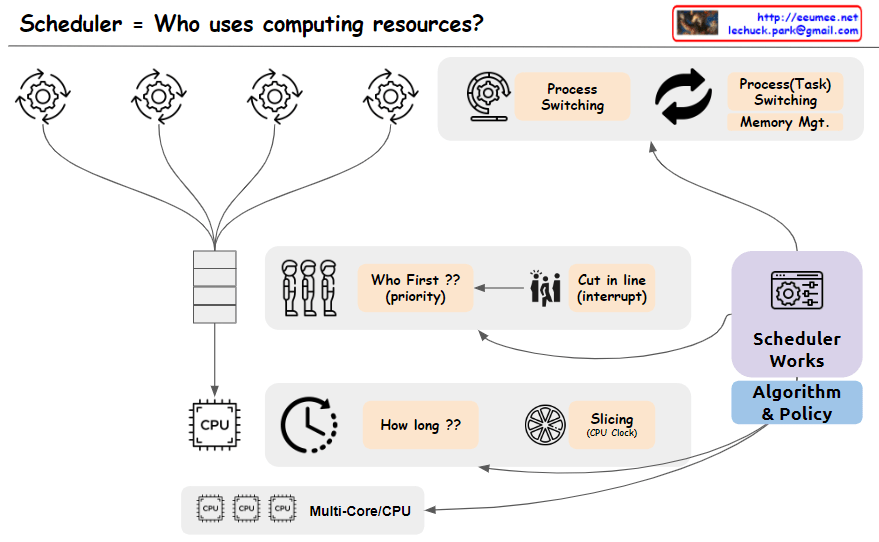
The image depicts a scheduler system that manages the allocation of computing resources, addressing the key question “Who uses computing resources?”. The main components shown are:
- Multiple processes or tasks are represented by circular icons, indicating entities requesting computing resources.
- A “Who First?? (priority)” block that determines the order or priority in which tasks will be serviced.
- A “Cut in Line (Interrupt)” block, suggests that certain tasks may be able to interrupt or take precedence over others.
- A CPU block represents the computing resources being scheduled.
- A “How long??” block, likely referring to the scheduling algorithm determining how long each task will be allocated CPU time.
- A “Slicing (Job Qsec)” block, which could be related to time slicing or dividing CPU time among tasks.
- Process switching and task switching blocks indicate the ability to switch between processes or tasks when scheduling CPU time.
- An “Algorithm & Policy” block, representing the scheduling algorithms and policies used by the scheduler.
- A “Multi-Core/CPU” block, explicitly showing support for multi-core or multi-CPU systems.
The image effectively covers the key concepts and components involved in scheduling computing resources, including task prioritization, interrupts, CPU time allocation, time slicing, process/task switching, scheduling algorithms and policies, and support for multi-core/multi-CPU systems. Memory management is assumed to be part of the task-switching process and is not explicitly depicted.
 Lechuck Park