Data Center Cooling System Power Usage Analysis
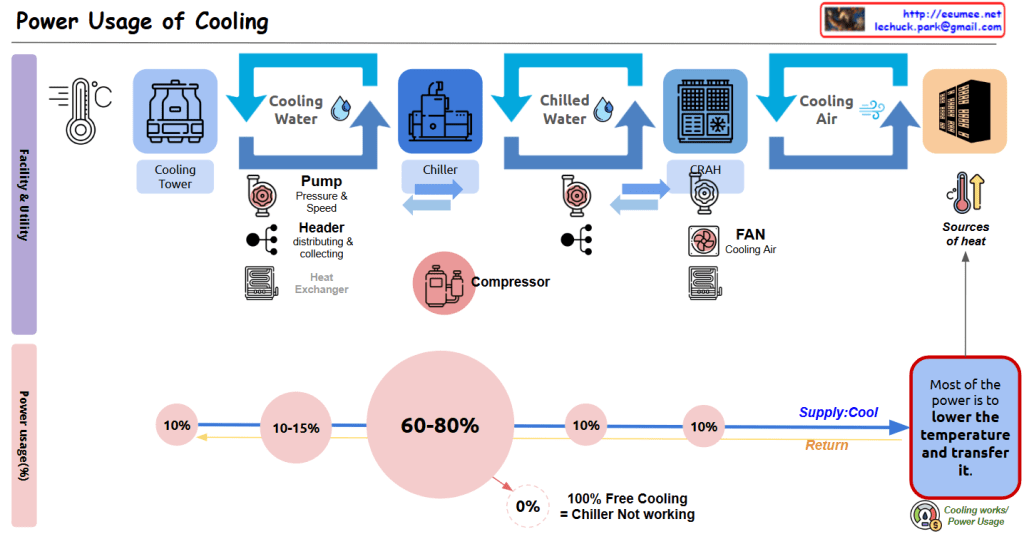
This diagram illustrates the cooling system configuration of a data center and the power consumption proportions of each component.
Cooling Facility Stages:
- Cooling Tower: The first stage, generating Cooling Water through contact between outside air and water.
- Chiller: Receives cooling water and converts it to Chilled Water at a lower temperature through the compressor.
- CRAH (Computer Room Air Handler): Uses chilled water to produce Cooling Air for the server room.
- Server Rack Cooling: Finally, cooling air reaches the server racks and absorbs heat.
Several auxiliary devices operate in this process:
- Pump: Regulates the pressure and speed of cooling water and chilled water.
- Header: Efficiently distributes and collects water.
- Heat Exchanger: Optimizes the heat transfer process.
- Fan: Circulates cooling air.
Cooling Facility Power Usage Proportions:
- Chiller/Compressor: The largest power consumer, accounting for 60-80% of total cooling power.
- Pump: Consumes 10-15% of power.
- Cooling Tower: Uses approximately 10% of power.
- CRAH/Fan: Uses approximately 10% of power.
- Other components: Account for the remaining 10%.
Purpose of Energy Usage (Efficiency):
- As indicated in the blue box on the lower right, “Most of the power is to lower the temperature and transfer it.”
- The system operates through Supply and Return loops to remove heat from the “Sources of heat.”
- The note “100% Free Cooling = Chiller Not working” indicates that when using natural cooling methods, the most power-intensive component (the chiller) doesn’t need to operate, potentially resulting in significant energy efficiency improvements.
This data center cooling system diagram illustrates how cooling moves from Cooling Tower to Chiller to CRAH to server racks, with compressors consuming the majority (60-80%) of power usage, followed by pumps (10-15%) and other components (10% each). The system primarily functions to lower temperatures and transfer heat, with the important insight that 100% free cooling eliminates the need for chillers, potentially saving significant energy.
With Claude
 Lechuck Park