Traceroute works 2

From DALL-E with some prompting
The image provides a detailed explanation of the ‘traceroute’ network diagnostic tool and how it functions, along with potential error messages and their meanings. The ‘traceroute’ command can work with not only ICMP but also TCP/UDP protocols, allowing it to trace the path data packets take through a network to reach the destination. Specifically, the command ‘traceroute -T -p 80 [destination]’ is used to trace the route to the destination over TCP port 80.

The diagram displays several routers (labeled 1, 2, 3, 4) that the traceroute may encounter on its path. Accompanying these are four cases, each illustrating a different error scenario that might occur during the trace:

  • Case1: A TCP block might occur, potentially due to a firewall or Access Control List (ACL), indicated by ICMP Type 3, Code 2 (Protocol Unreachable) or Code 10 (Communication with Destination Host is Administratively Prohibited).
  • Case2: A block on TCP Port 80 might be encountered, also possibly because of a firewall or ACL.
  • Case3: A general TCP block, which might be caused by iptables or similar tools, indicated by ICMP Type 3, Code 2 (Protocol Unreachable) or Code 13 (Communication Administratively Prohibited).
  • Case4: A block on TCP Port 80 or a service not being open on the destination, which can result in messages such as “Port Unreachable” or “Connection Refused”.

Each case provides the relevant ICMP message type and code that might be returned if such a situation occurs, which is crucial for network administrators or IT professionals in diagnosing and resolving network connectivity issues.
Connecting Dot

From DALL-E with some prompting
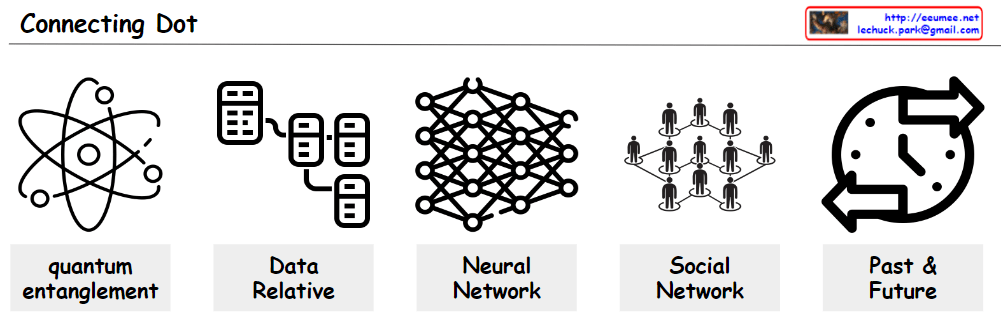
The image demonstrates how various distinct concepts are interconnected, emphasizing that all items are linked. ‘Quantum entanglement’ depicts particles whose states are interconnected regardless of physical distance, while ‘Data Relative’ represents the interactions between data. ‘Neural Network’ illustrates an AI model that learns complex data patterns, and ‘Social Network’ symbolizes the web of human relationships. Lastly, ‘Past & Future’ symbolizes the continuous changes occurring over time. All these concepts are interlinked, suggesting that new insights and innovations can arise from understanding these connections.

New BIZ ?

From DALL-E with some prompting
This diagram explains the process of finding new business opportunities from the perspective of digital transformation. The first step, ‘Digitization,’ involves converting real-world information into digital data while ensuring data quality. The next step, ‘Digitalization,’ extends the use of digital data to enhance automated processes. By executing these two steps, new opportunities can be discovered, and through ‘Digital Transformation,’ these discoveries can be converted into actual innovations. Overall, this process presents a methodology for leveraging digital technology to innovate business models and create new value.

System Call

From DALL-E with some prompting
This diagram illustrates the process by which an application process requests services from the operating system through a system call. Applications running in user space cannot directly access hardware resources and must go through the operating system located in kernel space to perform necessary operations. System calls act as an interface between user space and kernel space, which is crucial for the system’s stability and security. The operating system abstracts hardware resources, facilitating easy access for applications.

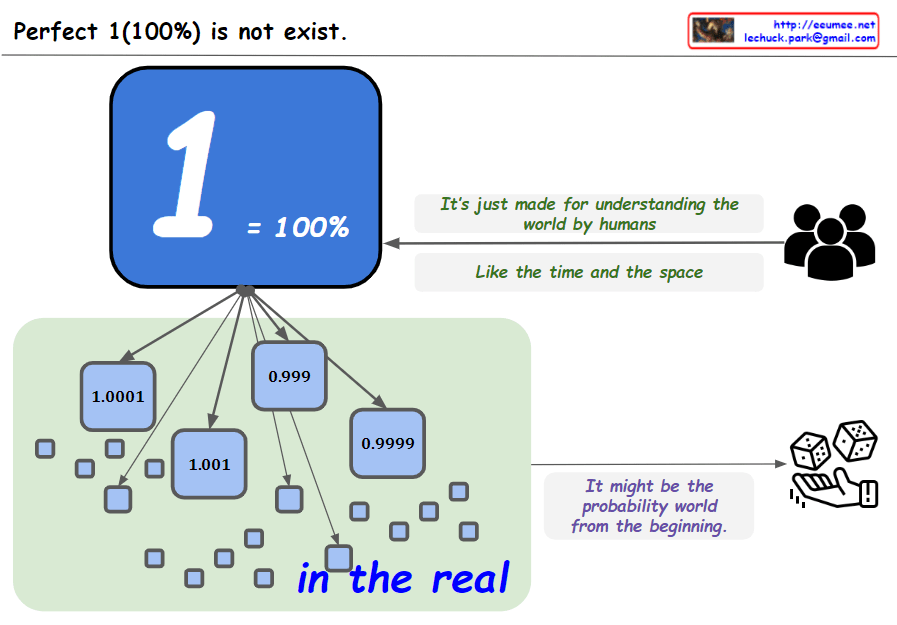
Perfect 1 ??

From the bard with some prompting
The image you provided consists of 10 squares with numbers from 1 to 0.9999, along with the phrase “Perfect 1 (100%) does not exist.”

The image conveys the message that perfection is impossible. The 10 squares represent 100%, but it is impossible to reach 100%, no matter how close we get. The number 0.9999 in the last square shows that it is close to perfection, but ultimately not perfect.

The image can also convey the message that the real world is uncertain and unpredictable. There is nothing that we can be 100% sure of, and there is always some uncertainty.

Finally, the image can convey the message that we are always growing and learning. The numbers from 1 to 0.9999 show that we are always getting closer to perfection, but we are never perfect.

The image is an open image that can be interpreted in many ways. Each individual can interpret the image according to their own experiences and values.

Here are some specific interpretations of the image:

Perfection is impossible: No matter how hard we try, we will never be perfect. There will always be room for improvement.
The real world is uncertain: There is always some risk or uncertainty in life. We cannot control everything that happens.
We are always growing and learning: We are constantly learning and evolving. We can always strive to be better.
Ultimately, the meaning of the image is up to the individual to decide.

Traceroute works I

From The Bard with some prompting
The image is a diagram of how a traceroute works. Traceroute is a tool that uses ICMP packets to determine the path that a packet takes from a source to a destination.

The image shows the following steps:

The source sends an ICMP packet with a TTL (time to live) of 1.
The first router that receives the packet decrements the TTL by 1 and sends it to the next router.
If the TTL reaches 0 before reaching the destination, the router sends an ICMP packet back to the source with an error message.
The source then sends an ICMP packet with a TTL of 2.
The process repeats until the destination is reached.
The text in the image provides additional information about each step. For example, the text for step 1 states that the source sends an ICMP packet with a TTL of 1. This means that the packet will be discarded by any router that receives it after it has traveled 1 hop.

The image also shows the following information:

  • The source IP address is 192.168.1.1.
  • The destination IP address is 203.0.113.5.
  • The RTT (round-trip time) for each hop is shown in milliseconds.

The image is a useful tool for understanding how traceroute works. It can be used to troubleshoot network problems by identifying the routers that are causing delays or errors.

Here is a more concise summary of the image:

Traceroute uses ICMP packets to determine the path that a packet takes from a source to a destination. The source sends an ICMP packet with a TTL of 1. If the TTL reaches 0 before reaching the destination, the router sends an ICMP packet back to the source with an error message. The source then sends an ICMP packet with a TTL of 2. The process repeats until the destination is reached.tunesharemore_vertadd_photo_alternate