Parallel Processing

Parallel Processing System Analysis

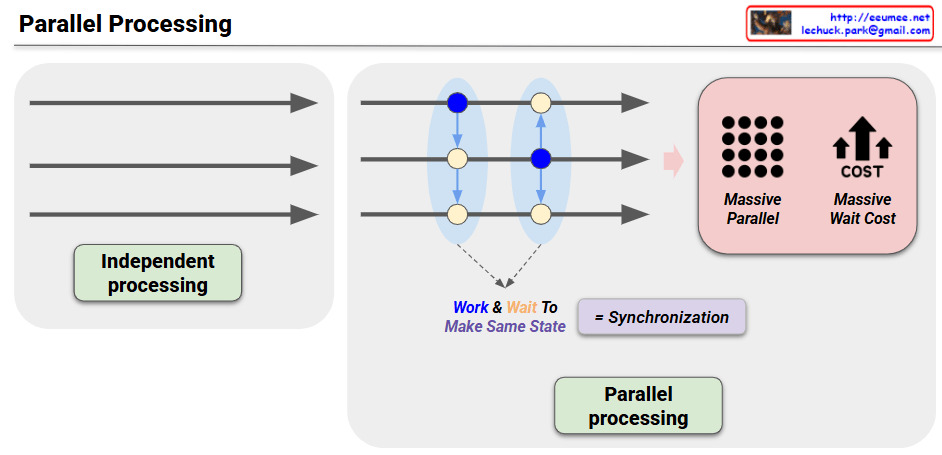
System Architecture

1. Input Stage – Independent Processing

  • Multiple tasks are simultaneously input into the system in parallel
  • Each task can be processed independently of others

2. Central Processing Network

Blue Nodes (Modification Work)

  • Processing units that perform actual data modifications or computations
  • Handle parallel incoming tasks simultaneously

Yellow Nodes (Propagation Work)

  • Responsible for propagating changes to other nodes
  • Handle system-wide state synchronization

3. Synchronization Stage

  • Objective: “Work & Wait To Make Same State”
  • Wait until all nodes reach identical state
  • Essential process for ensuring data consistency

Performance Characteristics

Advantage: Massive Parallel

  • Increased throughput through large-scale parallel processing
  • Reduced overall processing time by executing multiple tasks simultaneously

Disadvantage: Massive Wait Cost

  • Wait time overhead for synchronization
  • Entire system must wait for the slowest node
  • Performance degradation due to synchronization overhead

Key Trade-off

Parallel processing systems must balance performance enhancement with data consistency:

  • More parallelism = Higher performance, but more complex synchronization
  • Strong consistency guarantee = Longer wait times, but stable data state

This concept is directly related to the CAP Theorem (Consistency, Availability, Partition tolerance), which is a fundamental consideration in distributed system design.

With Claude

Synchronization Issues

From Claude with some prompting
This diagram illustrates various synchronization issues and their solutions in system synchronization processes. Let me break it down into three main parts:

  1. Copy-related Issues
  • Problems: High Load and Lack of Real Time
  • Solutions:
    • Increment Copy
    • Sync Scheduling
  1. Replication-related Issues
  • Problem: Network Delay
  • Solutions:
    • Timestamp Control
    • Checksum for comparison
  1. Synchronization-related Issues
  • Problems: Deadlock and Race Condition
  • Solutions:
    • Timeout settings
    • Priority Control
    • Semaphore/Mutex
    • Failure Recovery

Key Processes:

  • Maintaining “Keep the Same” status between systems
  • Detecting and notifying all changes (Noti & Detect All Changes)
  • Reflecting changes to other systems (reflect)

The diagram is well-structured with these notable features:

  1. Hierarchical Organization
  • Shows synchronization issues from top to bottom level
  • Progresses from Copy → Replications → Synchronization → Process Synchronization
  1. Clear Problem-Solution Mapping
  • Problems presented on the left (High Load, Network Delay, Deadlock, etc.)
  • Solutions presented on the right (visualized as green buttons)
  1. Visual Consistency
  • Problems shown in orange boxes
  • Solutions shown in green buttons
  • Process flows clearly indicated with arrows
  1. Practical Approach
  • Includes both theoretical concepts and practical implementation elements
  • Incorporates operational considerations like Failure Recovery

This structured organization serves as a valuable guide for understanding and solving complex synchronization problems in distributed systems or database replication systems.

synchronization

From Claude with some prompting
This diagram illustrates different types of synchronization methods. It presents 4 main types:

  1. Copy
  • A simple method where data from one side is made identical to the other
  • Characterized by “Make same thing”
  • One-directional data transfer
  1. Replications
  • A method that detects (“All Changes Sensing”) and reflects all changes
  • Continuous data replication occurs
  • Changes are sensed and reflected to maintain consistency
  1. Synchronization
  • A bi-directional method where both sides “Keep the Same”
  • Synchronization occurs through a central data repository
  • Both sides maintain identical states through mutual updates
  1. Process Synchronization
  • Synchronization between processes (represented by gear icons)
  • Features “Noti & Detect All Changes” mechanism
  • Uses a central repository for process synchronization
  • Ensures coordination between different processes

The diagram progressively shows how each synchronization method operates, from simple unidirectional copying to more complex bidirectional process synchronization. Each method is designed to maintain consistency of data or processes, but with different levels of complexity and functionality. The visual representation effectively demonstrates the flow and relationship between different components in each synchronization type.

The image effectively uses icons and arrows to show the direction and nature of data/process flow, making it easy to understand the different levels of synchronization complexity and their specific purposes in system design.

Synchronization

From DALL-E with some prompting
this image illustrates the concept of ‘Synchronization’. Synchronization is a mechanism used to ensure that when multiple processes or threads share data, they all have a consistent view of that data. If each edit were made to shared data concurrently, it could lead to inconsistent data states. The image contrasts ‘Not Same State’ with ‘Same State’, suggesting that only one process at a time should be able to modify shared data to maintain consistency.