From Claude with some prompting
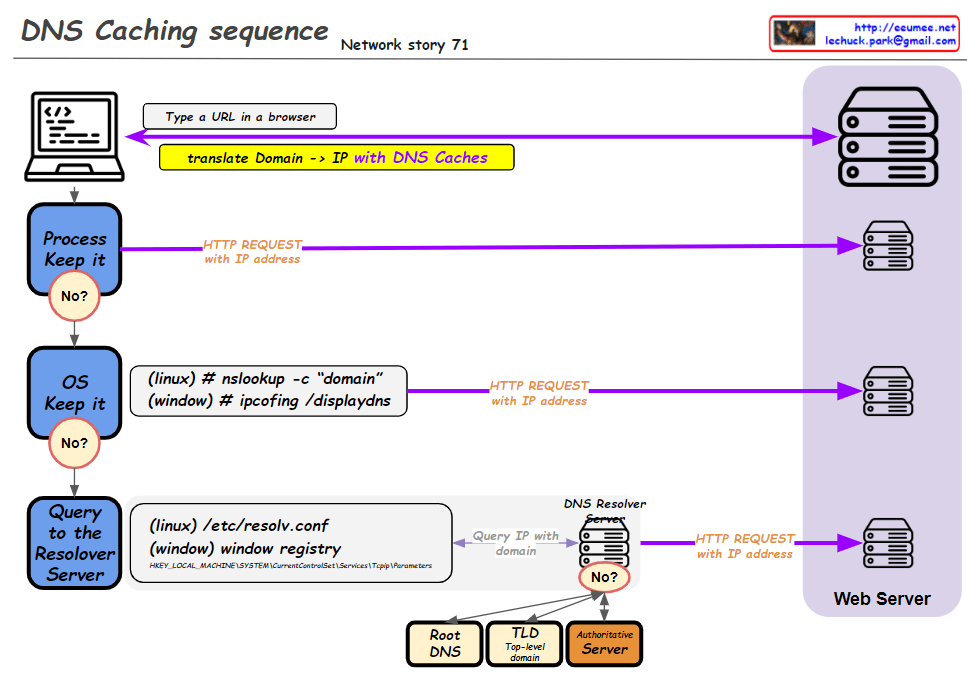
This improved diagram illustrates the DNS caching sequence more comprehensively. Here’s a breakdown of the process:
- A user types a URL in a browser.
- The system attempts to translate the domain to an IP address using DNS caches.
- Process Keep it: Checks the process-level DNS cache. If the information isn’t found here (“No”), it moves to the next step.
- OS Keep it: Checks the operating system-level DNS cache. For Linux, it uses the “nslookup -c domain” command, while for Windows, it uses “ipconfig /displaydns”. If the information isn’t found here (“No”), it proceeds to the next step.
- Query to the Resolver Server: The system queries the DNS resolver server. The resolver’s information is found in “/etc/resolv.conf” for Linux or the Windows Registry for Windows systems.
- If the resolver doesn’t have the information cached (“No”), it initiates a recursive query through the DNS hierarchy:
- Root DNS
- TLD (Top-Level Domain) server
- Authoritative server
- Once the IP address is obtained, an HTTP request is sent to the web server.
This diagram effectively shows the hierarchical nature of DNS resolution and the fallback mechanisms at each level. It demonstrates how the system progressively moves from local caches to broader, more authoritative sources when resolving domain names to IP addresses. The addition of the DNS hierarchy (Root, TLD, Authoritative) provides a more complete picture of the entire resolution process when local caches and the initial resolver query don’t yield results.

 Lechuck Park