MSS

From Claude with some prompting
This image explains the concept of Maximum Segment Size (MSS) in computer networking. MSS refers to the maximum size of the data payload that can be transmitted in a single TCP segment. The main points illustrated are:

  1. The TCP header and IP header each have a fixed size of 20 bytes.
  2. MSS is defined as the maximum size of the TCP payload within a single packet.
  3. MSS is used for TCP communication to control congestion and prevent large TCP packets at the application level.
  4. This is contrasted with the Maximum Transmission Unit (MTU) which limits packet size at the physical layer, such as in Ethernet switches.
  5. The image depicts a concept called “One Time Transfer Data Size” with 1 MTU packet being sent, followed by acknowledgment (3 DUP ACK), and then a timeout period.

The overall purpose of MSS is to manage and optimize data transmission by limiting the segment size, thereby facilitating better congestion control and efficient network performance.

MTU & MSS

From Copilot with some prompting
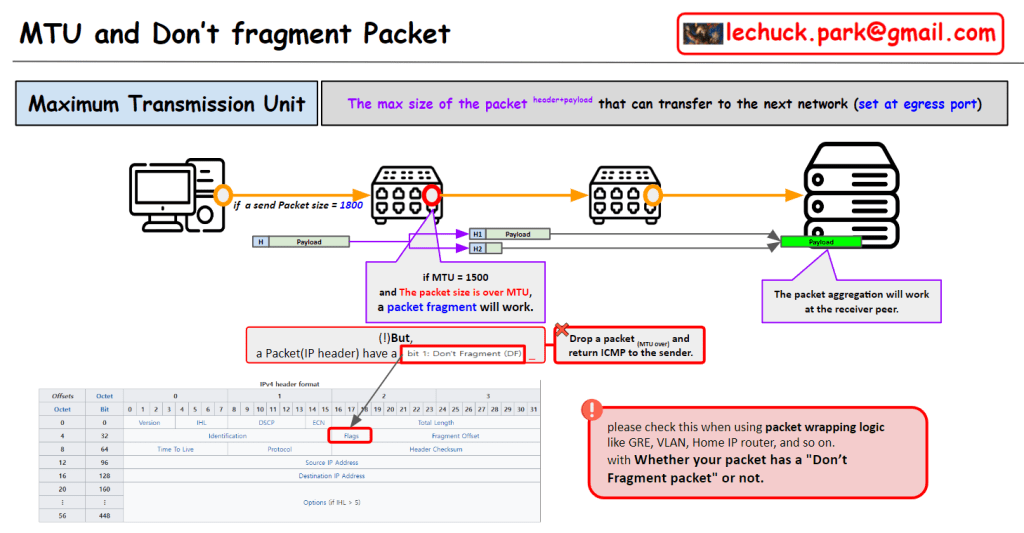
Certainly! Let’s clarify the distinct purposes of MTU (Maximum Transfer Unit) and MSS (Maximum Segment Size):

  1. MTU (Maximum Transfer Unit):
    • Associated with Ethernet, MTU represents the maximum size of an Ethernet frame.
    • When data is transmitted over a network, it is divided into smaller packets (frames). MTU defines the largest size a frame can be.
    • If a frame exceeds the MTU, it will be fragmented by the outgoing network device.
    • MTU optimization aims to efficiently share network bandwidth.
  2. MSS (Maximum Segment Size):
    • Associated with TCP (Transmission Control Protocol), MSS controls the flow of data within a TCP session.
    • It specifies the largest amount of data that can be sent in a single TCP segment.
    • The sender determines how many MSS units are sent at a given time.
    • MSS plays a crucial role in TCP congestion control and affects the TCP window size.

In summary, MTU focuses on frame size in the Ethernet layer, while MSS governs data segmentation and flow control in the TCP layer.

PING with “Don’t Fragment”

From DALL-E with some prompting
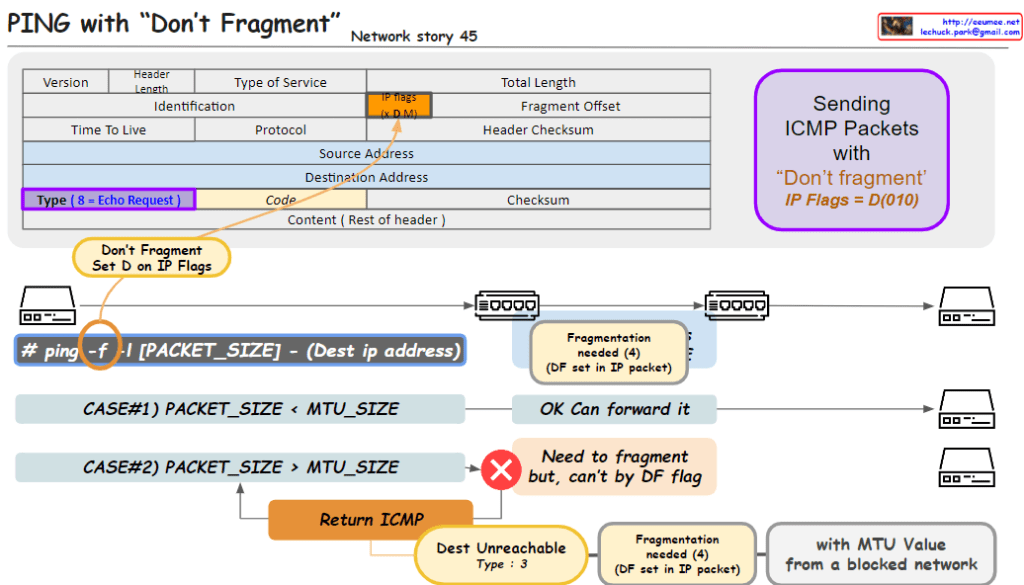
The image outlines a networking concept involving the transmission of ICMP (Internet Control Message Protocol) packets with the “Don’t Fragment” flag set, which is part of the IP (Internet Protocol) flags. Here’s a breakdown of the key elements in the image:

  1. Header Section:
    • Type of Service: Indicates the quality of service for the packet.
    • IP Flags: Contains the “Don’t Fragment” (DF) flag, indicated by setting the D bit to 0. The “MF” bit represents whether the packet is the last fragment.
    • Type: For an ICMP Echo Request, this value is set to 8.
    • Code: Used to further specify the message.
  2. Packet Transmission:
    • The command ping -f is used to send a ping with the DF flag set, which means the packets should not be fragmented, even if their size exceeds the MTU (Maximum Transmission Unit) of the network path.
    • Case #1: If the packet size is less than the MTU, the packet is forwarded without issue.
    • Case #2: If the packet size is greater than the MTU, it needs to be fragmented. However, because the DF flag is set, it can’t be fragmented, resulting in a “Destination Unreachable” message with code 3 (Fragmentation needed and DF set).
  3. Error Handling:
    • The ICMP error message “Destination Unreachable” with a code of “3” is returned if a packet with the DF flag set needs to be fragmented to continue along the network path but cannot be due to the flag.

This image is a guide to understanding how the “Don’t Fragment” flag in IP packets affects their transmission over networks and how ICMP is used for error reporting when the flag is set.