CPU Isolation & Affinity

With a Claude’s Help
CPU Isolation & Affinity is a concept that focuses on pinning and isolating CPU cores for real-time tasks. The diagram breaks down into several key components:

  1. CPU Isolation
  • Restricts specific processes or threads to run only on specific CPU cores
  • Isolates other processes from using that core to ensure predictable performance and minimize interference
  1. CPU Affinity
  • Refers to preferring a process or thread to run on a specific CPU core
  • Doesn’t necessarily mean it will only run on that core, but increases the probability that it will run on that core as much as possible
  1. Application Areas:

a) Real-time Systems

  • Critical for predictable response times
  • CPU isolation minimizes latency by ensuring specific tasks run without interference on the cores assigned to them

b) High Performance Computing

  • Effective utilization of CPU cache is critical
  • CPU affinity allows processes that reference data frequently to run on the same core to increase cache hit rates and improve performance

c) Multi-core Systems

  • If certain cores have hardware acceleration capabilities
  • Can increase efficiency by assigning cores based on the task

This system of CPU management is particularly important for:

  • Ensuring predictable performance in time-sensitive applications
  • Optimizing cache usage and system performance
  • Making efficient use of specialized hardware capabilities in different cores

These features are essential tools for optimizing system performance and ensuring reliability in real-time operations.
MLOCK (LINUX KERNEL)

With a Claude’s Help
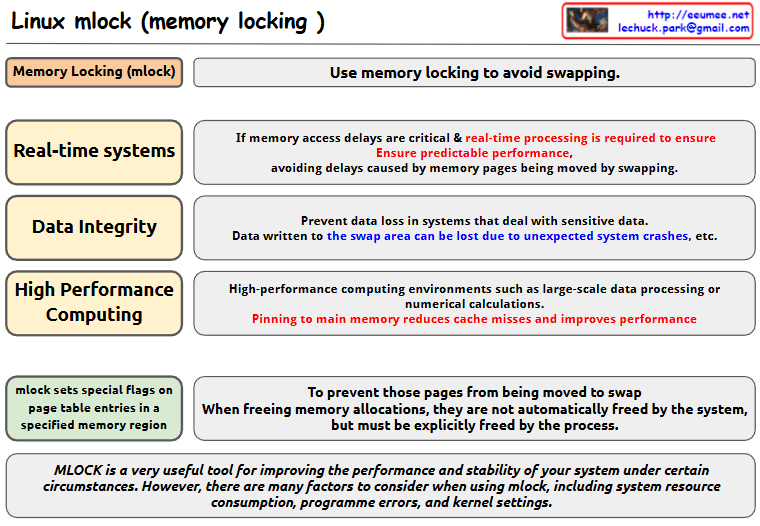
this image about Linux mlock (memory locking):

  1. Basic Concept
  • mlock is used to avoid memory swapping
  • It sets special flags on page table entries in specified memory regions
  1. Main Use Cases
  • Real-time Systems
    • Critical for systems where memory access delays are crucial
    • Ensures predictable performance
    • Prevents delays caused by memory pages being moved by swapping
  • Data Integrity
    • Prevents data loss in systems dealing with sensitive data
    • Data written to swap areas can be lost due to unexpected system crashes
  • High Performance Computing
    • Used in environments like large-scale data processing or numerical calculations
    • Pinning to main memory reduces cache misses and improves performance
  1. Implementation Details
  • When memory locations are freed using mlock, they must be explicitly freed by the process
  • The system does not automatically free these pages
  1. Important Note mlock is a very useful tool for improving system performance and stability under certain circumstances. However, users need to consider various factors when using mlock, including:
  • System resource consumption
  • Programme errors
  • Kernel settings

This tool is valuable for system optimization but should be used carefully with consideration of these factors and requirements.

The image presents this information in a clear diagram format, with boxes highlighting each major use case and their specific benefits for system performance and stability.Copy

Real-time Linux

with a claude’s help
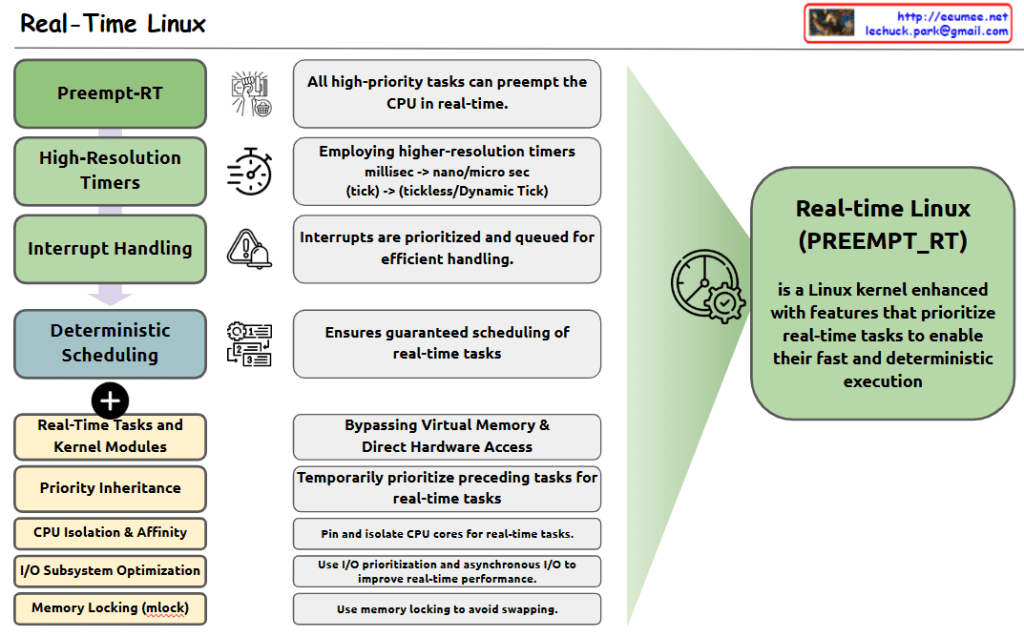
The image shows the key components and features of Real-Time Linux, which is defined as a Linux kernel enhanced with features that prioritize real-time tasks for fast and deterministic execution.

Four Main Components:

  1. Preempt-RT: All high-priority tasks can preempt the CPU in real-time.
  2. High-Resolution Timers: Employs higher-resolution timers, shifting from millisec to nano/micro sec (tick -> tickless/Dynamic Tick).
  3. Interrupt Handling: Interrupts are prioritized and queued for efficient handling.
  4. Deterministic Scheduling: Ensures guaranteed scheduling of real-time tasks.

Additional Features:

  • Real-Time Tasks and Kernel Modules
  • Priority Inheritance
  • CPU Isolation & Affinity
  • I/O Subsystem Optimization
  • Memory Locking (mlock)

Key Functionalities:

  • Bypassing Virtual Memory & Direct Hardware Access
  • Temporarily prioritize preceding tasks for real-time tasks
  • Pin and isolate CPU cores for real-time tasks
  • Use I/O prioritization and asynchronous I/O to improve real-time performance
  • Use memory locking to avoid swapping

The right side of the diagram shows the overall purpose: Real-Time Linux (PREEMPT_RT) is a Linux kernel enhanced with features that prioritize real-time tasks to enable their fast and deterministic execution.

This system is designed to provide predictable and consistent performance for time-critical applications, making it suitable for real-time computing environments where timing precision is crucial.

Lechuck History

From Claude with some prompting
“Lechuck History” diagram demonstrates the following technical career progression:

  1. “with Computer” section:
    • Advanced from C-based programming to system programming, O&M solutions, and network programming
    • Possess deep understanding of Linux kernel, RTOS, and TCP/IP stack
    • Performed “Single-Handedly A to Z” tasks in web service analysis/monitoring
    • Grew into the role of a software engineer
  2. “with People” section:
    • Gained experience in large ISP data centers, system management, large-scale network operations management, and CDN development/management
    • Developed skills to optimize and maximize existing system infrastructure
    • Created new service solutions including D/C business web portals, NMS big-data, DCIM, packet analysis customer solutions, and data analysis platforms
    • Managed “Big DC Op. System Design & DevOps”, demonstrating ability to handle customer-facing roles and collaborate with various partners

Additional key competencies:

  1. Maintain continuous interest in new technologies
  2. Possess the ability to quickly learn based on a solid understanding of fundamentals
  3. Currently enjoy learning cutting-edge technologies including AI and Quantum computing

This career path and skill set demonstrate the profile of a professional who continuously grows and pursues innovation in a rapidly changing technological environment.

Memoy Leak

From Claude with some prompting
This image illustrates the process of “Memory Leak Checking”. The main components and steps are as follows:

  1. Process Is Started:
    • When a process starts, it connects through an API to a “Like Virtual Machine” environment.
    • In this environment, “Hooking” techniques are employed.
  2. Process Is Running:
    • The running process generates a “Software Interrupt” through the API.
    • There’s “Tracking syscall with Ptrace()” occurring at this stage.
  3. Memory :
    • Functions related to memory allocation, modification, and deallocation (such as malloc(), calloc(), free()) are called.
  4. Memory Leakage Management:
    • This component tracks memory Changes and Status.
  5. OS kernel:
    • OS kernel parameters about memory are involved in the process.

The diagram shows the overall process of detecting and managing memory leaks. It demonstrates how memory leaks are systematically monitored and managed from the start of a process, through its execution, memory management, and interaction with the operating system.
This diagram effectively visualizes the complex process of memory leak checking, showing how different components interact to monitor and manage memory usage in a running process.

How to share access to files

From Claude with some prompting
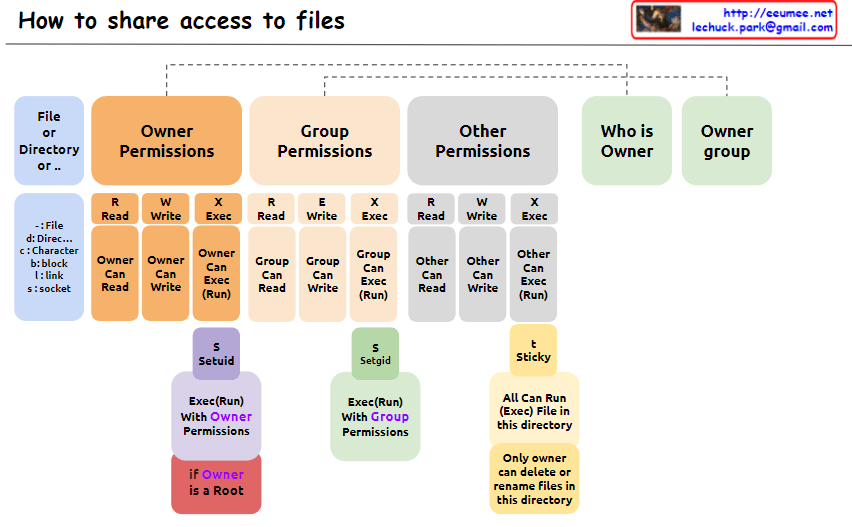
The image explains “How to share access to files” in Unix/Linux systems, illustrating the structure of file permissions. The diagram breaks down permissions into owner, group, and other categories, along with special permissions and metadata.

  1. File Permissions Structure: The image depicts how access rights to files or directories are shared in Unix/Linux systems. Permissions are divided into owner, group, and other users.
  2. Owner Permissions:
    • Read (R): Owner can read the file.
    • Write (W): Owner can modify the file.
    • Execute (X): Owner can execute the file.
  3. Group Permissions:
    • Read (R): Group members can read the file.
    • Write (W): Group members can modify the file.
    • Execute (X): Group members can execute the file.
  4. Other Permissions:
    • Read (R): Other users can read the file.
    • Write (W): Other users can modify the file.
    • Execute (X): Other users can execute the file.
  5. Metadata:
    • Who is Owner: Indicates who owns the file or directory.
    • Owner group: Shows which group the file or directory belongs to.
  6. Special Permissions: a. SetUID (S):
    • Executes with the file owner’s permissions.
    • Useful when a regular user runs the passwd command owned by root.
    b. SetGID (S):
    • Executes with the file group’s permissions.
    • Beneficial for group collaboration; new files can inherit the parent directory’s group.
    c. Sticky (T) – Corrected Part:
    • “Only owner can delete or rename files in this directory”
    • When set on a directory, files within it can only be deleted or renamed by the file’s owner, directory owner, or root.
    • Commonly used in shared directories like /tmp to prevent users from unauthorized deletion or renaming of each other’s files.
  7. Additional Information:
    • “if Owner is a Root”: When the owner is the root user, special privileges are granted. Root has all permissions on every file and directory, enabling any system administration task.

This image provides a clear and visual explanation of the file permission system in Unix/Linux. Notably, the description of the Sticky bit has been corrected to accurately reflect its function: “Only owner can delete or rename files in this directory”. This correction properly conveys that while execution and modification of files in a Sticky directory are governed by individual file permissions, the ability to delete or rename files is restricted to the file owner, directory owner, or root.

This permission system effectively manages security and accessibility in multi-user environments. It allows fine-grained control over who can read, write, or execute files, and in the case of the Sticky bit, who can delete or rename files in shared spaces. Such granular control is crucial for maintaining data integrity, privacy, and orderly collaboration among users on a Unix/Linux system.

Memory Control Unit

From Claude with some prompting
The image explains the memory management and access approaches in computing systems. Fundamentally, for any memory management approach, whether hardware or software, there needs to be a defined unit of operation.

At the hardware level, the physical Memory Access Unit is determined by the CPU’s bit width (32-bit or 64-bit).

At the software/operating system level, the Paging Unit, typically 4KB, is used for virtual memory management through the paging mechanism.

Building upon these foundational units, additional memory management techniques are employed to handle memory regions of varying sizes:

  • Smaller units: Byte-addressable memory, bit operations, etc.
  • Larger units: SLAB allocation, Buddy System, etc.

Essentially, the existence of well-defined units at the hardware and logical/software layers is a prerequisite that enables comprehensive and scalable memory management. These units serve as the basis for memory control mechanisms across different levels of abstraction and size requirements in computing systems.