DNS Why?

From Claude with some prompting
This image is a network diagram explaining the function and importance of DNS (Domain Name System). The main points are:

  1. WWW service works with DNS on TCP/IP.
  2. DNS is responsible for mapping domains to IP addresses.
  3. All network devices on the Internet can only route to IP addresses.
  4. It’s difficult to include actual service characteristics in IP addresses (only by number).
  5. Domain addresses are easy to use and must be mapped to IP addresses.
  6. On the client side, there’s a DNS Resolver (caching).
  7. On the server side, there’s a DNS server, which includes Authoritative Server, Root Server, and TLD Server. These are managed by IANA.
  8. At the center of the diagram is the key question: “So, how does DNS-IP Mapping work?”

This diagram visually explains the working principle of DNS and its importance in the Internet. It emphasizes the crucial role DNS plays in translating user-friendly domain names into IP addresses that computers can understand.

Reverse Path Forwarding

From Claude with some prompting
The image explains the two main modes of Reverse Path Forwarding (RPF): Strict RPF and Loose RPF.

At the top left, three hosts are sending packets to a router. The router is determining which port to use for forwarding based on the source IP address during the routing process.

The top right explains the operation of Strict RPF. In Strict RPF, all packets are validated. It compares the port used for routing the source IP with the actual receiving port, and allows the packet only if they match.

The note under Strict RPF mentions that it prevents “No Looping (primarily for multicast)” and “No Spoofing (primarily for unicast)”. Both Strict RPF and Loose RPF can help prevent looping and spoofing to some extent.

No Looping is primarily important for multicast routing. RPF is used in multicast protocols to prevent packet loops. Both Strict RPF and Loose RPF aid in loop prevention.

No Spoofing is primarily related to security issues with unicast IP traffic. IP spoofing involves an attacker using a forged source IP address to launch network attacks. Both Strict RPF and Loose RPF are effective in mitigating IP spoofing attacks.

The bottom right explains Loose RPF. In Loose RPF, an RPF interface list for the source address is configured for each port. If the receiving port is in the RPF list for that source IP, the packet is allowed.

Therefore, while Strict RPF provides more comprehensive packet checking, Loose RPF can also help prevent looping (mainly in multicast) and spoofing (mainly in unicast) by referring to the pre-configured RPF interface lists for each port and source address.


Hub/Switch/Router

From ChatGPT with some prompting
The image appears to be an educational diagram explaining the basic functions and differences between three types of network devices: hubs, switches, and routers. Here’s what the image indicates about each device:

  • Hub: A hub is a simple networking device that broadcasts all incoming data packets to every connected device, regardless of the destination MAC address. It’s depicted as sending the same data to devices A, B, C, and D.
  • Switch: Unlike a hub, a switch is intelligent enough to filter and forward data packets based on their destination MAC addresses. This means it only sends the data to the specific device it is intended for, improving network efficiency and reducing collisions.
  • Router: A router operates at a higher level than switches and hubs. It routes data packets not just based on MAC addresses but also using IP addresses. It can connect multiple networks and manage the data traffic between them using protocols like BGP (Border Gateway Protocol).

The note at the bottom of the image states that the functions of these devices are not completely separated, and higher-level equipment includes the functions of the lower-level equipment. This means routers can perform the functions of switches, which in turn can perform the functions of hubs.

From Gemini with some prompting
The image is a diagram of a network consisting of hubs, switches, and routers. The functions of each device are as follows:

Hub: A hub is a central device that connects network devices. All devices connected to a hub can communicate with each other. When a hub receives a data frame, it transmits it to all ports.

Switch: A switch is similar to a hub, but it only transmits data to the device connected to each port. A switch uses MAC addresses to determine which port to transmit a data frame to.

Router: A router is a device that connects two or more networks. A router uses IP addresses to determine which network to transmit a data packet to.

In the image, each device is connected as follows:

  • Computers A, B, C, D: Each computer is connected to a hub or switch.
  • Hub: The hub is connected to a switch.
  • Switch: The switch is connected to a router.

The image also includes a description of the type of data that each device handles:

  • Hub: The hub transmits all data frames to all ports.
  • Switch: The switch uses MAC addresses to determine which port to transmit a data frame to.
  • Router: The router uses IP addresses to determine which network to transmit a data packet to.

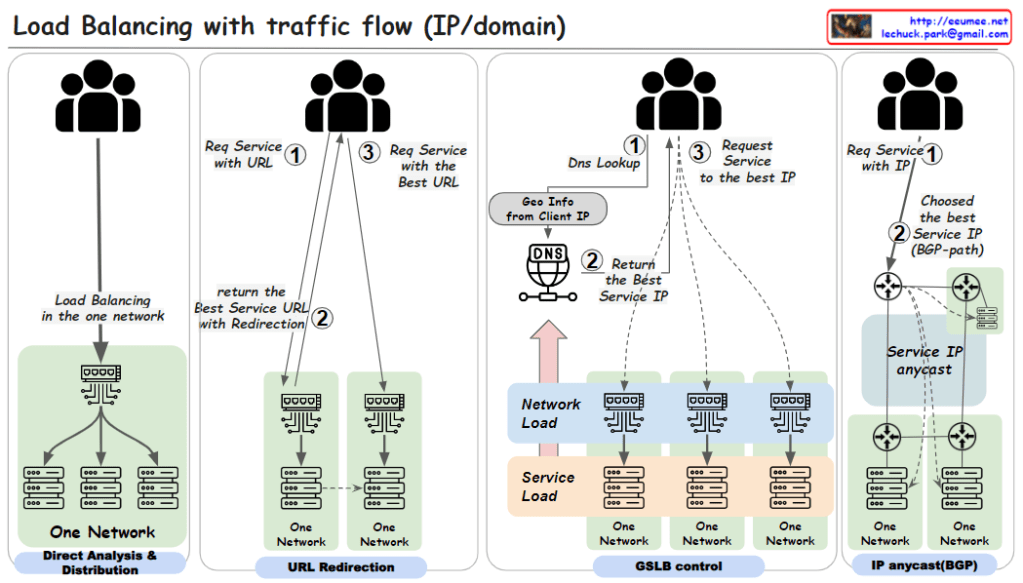
Load balancing with traffic flow

From ChatGPT with some prompting

  1. Direct Analysis & Distribution within One Network:
    • This method involves load balancing within a single network using a load balancing switch. The user requests a service via a URL (step 1). The load balancing is handled internally by the switch, which directly analyzes traffic and distributes the load to various servers within the network.
  2. URL Redirection:
    • Here, a user requests a service using a URL (step 1). The network then uses URL redirection to guide the user to the best service URL (step 2), which may involve multiple redirections within one network until the most optimal service endpoint is selected for the user (step 3).
  3. GSLB (Global Server Load Balancing) Control:
    • In this approach, the user starts with a DNS lookup when requesting a service (step 1). The DNS uses the geographic information from the client’s IP to return the best service IP (step 2). The user then requests the service at the given IP address (step 3). This method uses global considerations such as network and service load to balance traffic across multiple networks.
  4. IP Anycast with BGP (Border Gateway Protocol):
    • Users request a service directly using an IP address (step 1). The best service IP is determined via the BGP, which routes traffic based on the shortest available path (step 2). With IP anycast, the user is automatically directed to the nearest or most appropriate service location based on network routing protocols.

Each of these methods is designed to distribute network traffic efficiently. The goal is to ensure service reliability and performance, optimize server use, and improve the overall user experience by reducing latency.

Anomaly IP Packet header

From Gemini with some prompting
Title: Anomaly Detection (IP Packet Header)

Overview:

The image illustrates the structure of an IP packet header and how to detect anomalous activities based on TCP/IP header information.

Key Elements:

  • IP Address: Identifies the server.
  • TCP/UDP Port: Used to send and receive packets.
  • Service Port Number: Port number used to connect to a specific service.
  • Service Area: IP address range where a specific service is provided.

Indicators of Anomalous Activity:

  • Unknown IP: Packets coming from unknown IP addresses.
  • Foreign IP: Packets coming from overseas IP addresses.
  • Unused Port: Packets sent to unused ports.
  • TCP/UDP Port == 0: Packets with TCP/UDP port number 0.
  • IP/TCP Checksum == 0: Packets with IP/TCP checksum 0.
  • Unused IP Protocol: Packets using unused protocols.
  • Too Large (IP.ttl): Packets with excessively large TTL values.
  • Too Many (TCP Syn): Excessive number of SYN packets.
  • Too Many (IP. fragmented): Excessive number of fragmented packets.

TCP/IP 5 tuple

From DALL-E with some prompting
The image summarizes how to use the 5-tuple network criteria to check additional information and detect abnormal packet patterns. The 5-tuple includes the IP Protocol, Source IP, Source Port, Destination IP, and Destination Port, which helps to identify network communication sessions. Additional insights such as location tracking through ASN or GEO, whether a server IP is static, anonymous client IP, access to unused ports, and the usage of specific ports can be leveraged to analyze network traffic and identify security threats. This information, along with application protocols, can be utilized by network administrators to detect strange packets or unusual network activities.

Switching & Routing (Origin)

From DALL-E with some prompting
The image delineates the foundational aspects of network switching and routing based on their origins. Switching, historically in LANs, involved the broadcasting of packets, which modern switches now intelligently direct or block based on MAC addresses and VLAN information. Routing originally functioned to determine packet pathways over networks using IP address information. While these were once discrete tasks performed by separate devices, contemporary network technology often integrates both functions within the same hardware, allowing switches to perform some routing tasks and vice versa, reflecting the evolution and convergence of networking equipment.