Domain to IP

From Claude with some prompting
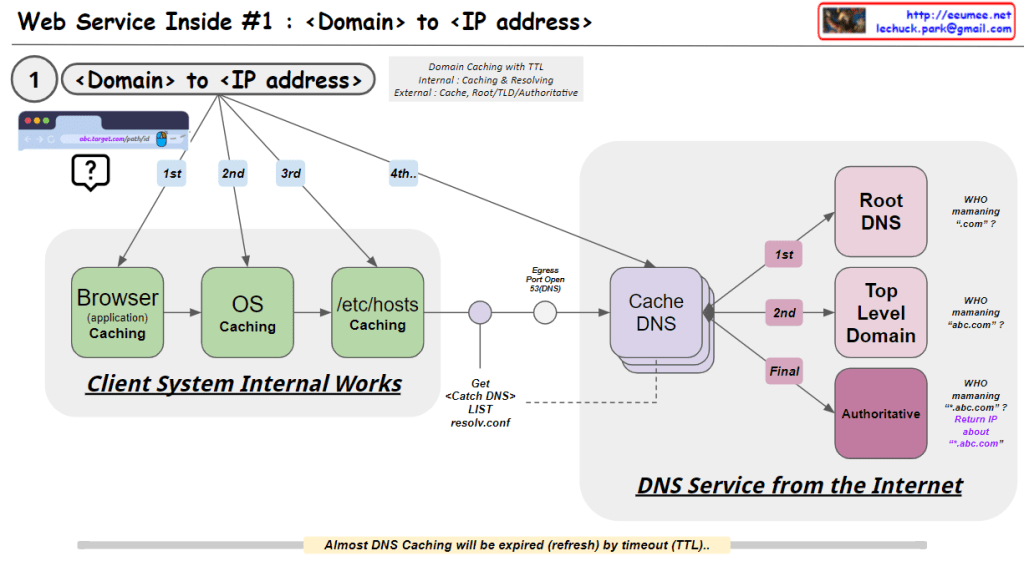
This image illustrates the process of converting a domain name to an IP address, which is the first step in web service operations. Here’s a breakdown of the image:

  1. Client System Internal Works:
    • Browser (application) Caching: The first level of caching occurs in the web browser.
    • OS Caching: The second level of caching is at the operating system level.
    • /etc/hosts Caching: The third level involves checking the local hosts file.
  2. DNS Service from the Internet:
    • Cache DNS: This is the first point of contact with external DNS services.
    • Root DNS: Manages top-level domains like “.com”.
    • Top Level Domain: Manages specific top-level domains (e.g., “.com”, “.org”).
    • Authoritative DNS: Provides the final, authoritative IP address for the specific domain.

The process follows a hierarchical order:

  1. Check Browser cache
  2. Check OS cache
  3. Check /etc/hosts file
  4. Query Cache DNS server
  5. If not found, Cache DNS queries Root DNS
  6. Then queries Top Level Domain
  7. Finally queries Authoritative DNS to get the IP address

The image also notes:

  • DNS caching uses TTL (Time To Live) for expiration.
  • The system uses a resolve.conf file to get the Cache DNS list.
  • It questions who is managing various levels of DNS (“.com”, “abc.com”, etc.)

This process ensures efficient and hierarchical resolution of domain names to IP addresses, utilizing various caching mechanisms to improve speed and reduce network load.
DNS Caching SEQ

From Claude with some prompting
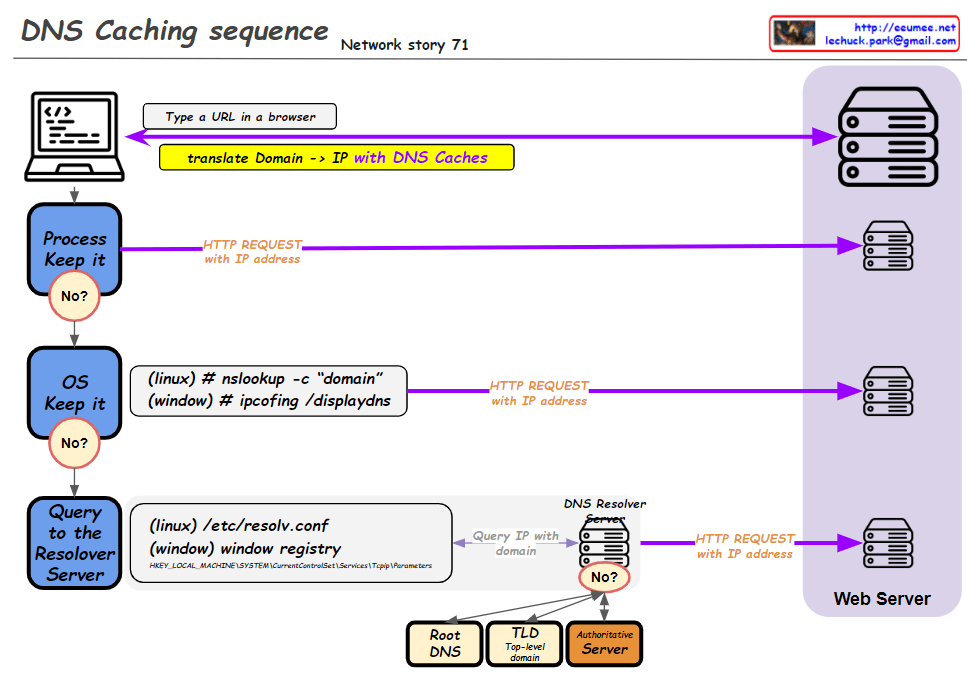
This improved diagram illustrates the DNS caching sequence more comprehensively. Here’s a breakdown of the process:

  1. A user types a URL in a browser.
  2. The system attempts to translate the domain to an IP address using DNS caches.
  3. Process Keep it: Checks the process-level DNS cache. If the information isn’t found here (“No”), it moves to the next step.
  4. OS Keep it: Checks the operating system-level DNS cache. For Linux, it uses the “nslookup -c domain” command, while for Windows, it uses “ipconfig /displaydns”. If the information isn’t found here (“No”), it proceeds to the next step.
  5. Query to the Resolver Server: The system queries the DNS resolver server. The resolver’s information is found in “/etc/resolv.conf” for Linux or the Windows Registry for Windows systems.
  6. If the resolver doesn’t have the information cached (“No”), it initiates a recursive query through the DNS hierarchy:
    • Root DNS
    • TLD (Top-Level Domain) server
    • Authoritative server
  7. Once the IP address is obtained, an HTTP request is sent to the web server.

This diagram effectively shows the hierarchical nature of DNS resolution and the fallback mechanisms at each level. It demonstrates how the system progressively moves from local caches to broader, more authoritative sources when resolving domain names to IP addresses. The addition of the DNS hierarchy (Root, TLD, Authoritative) provides a more complete picture of the entire resolution process when local caches and the initial resolver query don’t yield results.

DNS work sequence

From Claude with some prompting
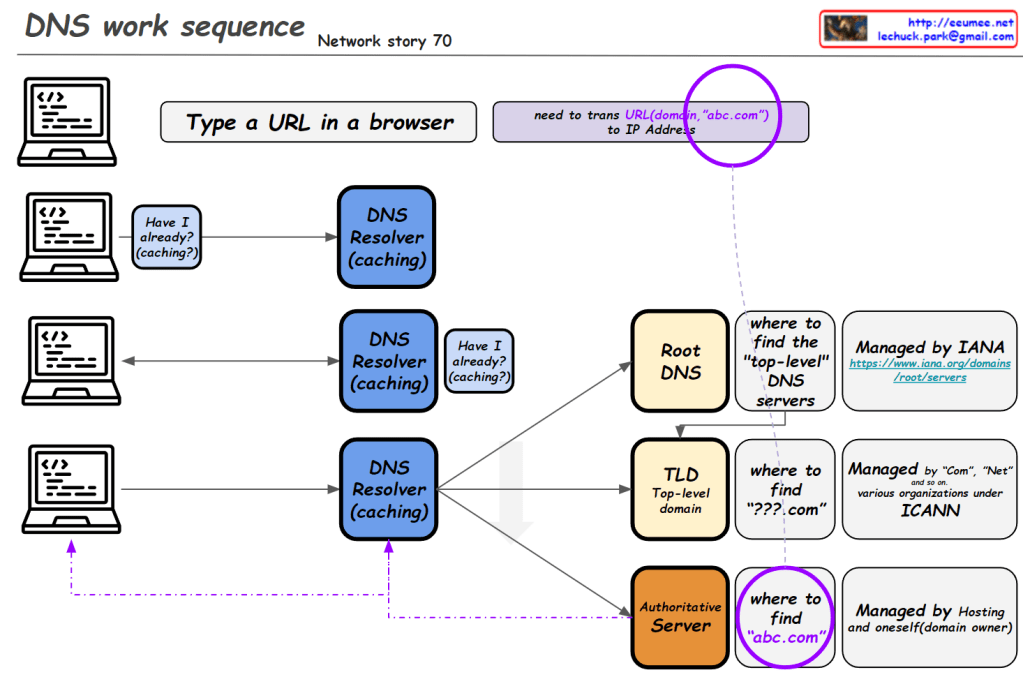
This image illustrates the DNS (Domain Name System) work sequence. Here’s a breakdown:

  1. It starts with typing a URL in a browser. For example, entering “abc.com” requires translation to an IP address.
  2. The DNS resolution process begins, involving multiple levels of DNS resolvers with caching capabilities.
  3. At each level, there’s a “Have I already? (caching?)” check. If the information is cached, it’s used immediately.
  4. If not found, it proceeds to the next level:
    • Root DNS: Provides information on top-level DNS servers (Managed by IANA)
    • TLD (Top-Level Domain): Gives information on domains like “.com” (Managed by various organizations under ICANN)
    • Authoritative Server: Provides actual domain information (e.g., abc.com, managed by hosting providers or domain owners)
  5. Through these stages, the system finds the necessary information to ultimately obtain the IP address of the entered domain.

This diagram effectively demonstrates the hierarchical structure of DNS lookup process and the caching mechanism at each stage.

DNS Why?

From Claude with some prompting
This image is a network diagram explaining the function and importance of DNS (Domain Name System). The main points are:

  1. WWW service works with DNS on TCP/IP.
  2. DNS is responsible for mapping domains to IP addresses.
  3. All network devices on the Internet can only route to IP addresses.
  4. It’s difficult to include actual service characteristics in IP addresses (only by number).
  5. Domain addresses are easy to use and must be mapped to IP addresses.
  6. On the client side, there’s a DNS Resolver (caching).
  7. On the server side, there’s a DNS server, which includes Authoritative Server, Root Server, and TLD Server. These are managed by IANA.
  8. At the center of the diagram is the key question: “So, how does DNS-IP Mapping work?”

This diagram visually explains the working principle of DNS and its importance in the Internet. It emphasizes the crucial role DNS plays in translating user-friendly domain names into IP addresses that computers can understand.

IP & Domain address

From DALL-E with some prompting
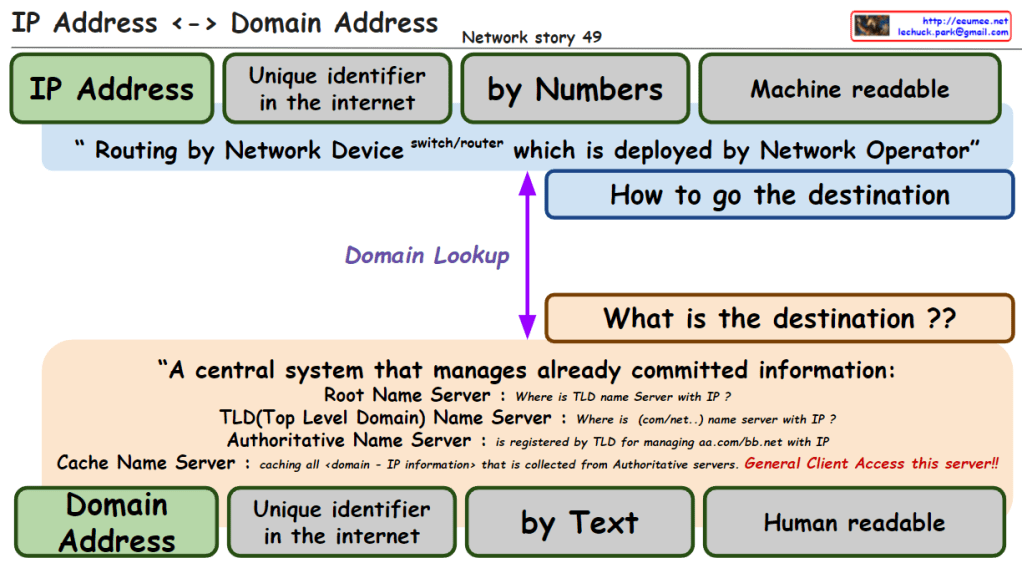
The image explains the relationship between IP addresses and domain addresses within the context of the internet and network infrastructure. Here’s a breakdown of the components:

  1. IP Address: Identified as a unique identifier in the internet by numbers, which is machine-readable. It is used for routing by network devices like switches and routers, deployed by network operators.
  2. Domain Lookup: The process that determines how to get the destination, asking “what is the destination?”
  3. Domain Address: Also a unique identifier on the internet, represented by text, which is human-readable.
  4. Central System of Name Servers:
    • Root Name Server: Answers queries about the location of the Top-Level Domain (TLD) name server associated with an IP.
    • TLD Name Server: Provides information about the domain’s name server associated with certain domain extensions like .com or .net.
    • Authoritative Name Server: Holds the definitive records for domains within its TLD.
    • Cache Name Server: Caches all domain-to-IP information collected from authoritative servers, accessible to general clients.

The overall message emphasizes the conversion between IP addresses (numeric form) and domain addresses (text form), which is crucial for navigating the internet and finding the correct destination for data packets. It also highlights the significance of the Domain Name System (DNS) in translating between human-readable domain names and machine-readable IP addresses.

Overall IP Network

From DALL-E with some prompting
The image is a diagram explaining the overall structure and data flow of an IP network.

Overall IP network: The entire structure of an IP network
Ethernet In the LAN: Ethernet used within the Local Area Network (LAN)
Identification in the internet: Identifying devices on the internet
OSPF short path with IP addresses: Open Shortest Path First (OSPF) routing protocol finds the shortest path using IP addresses
Addressing/Routing to the peer: Assigning addresses and routing to peer devices
BGP to get/share IP (other & me): Border Gateway Protocol (BGP) is used for obtaining and sharing IP addresses between others and oneself
Service Connection: Establishing a service connection
IP address ↔ Domain address: The relationship between IP addresses and domain addresses
DNS Easy to keep an internet address by Domain name: Domain Name System (DNS) makes it easy to maintain an internet address by using domain names
On TCP/UDP: Operating on TCP (Transmission Control Protocol) and UDP (User Datagram Protocol)
The diagram illustrates how data moves within a network. For instance, when a user accesses web services using the HTTP protocol, the DNS translates domain names into IP addresses, and then a service connection is established using the IP address over TCP/UDP protocols. Routing protocols such as OSPF and BGP are used to find the optimal path for data transmission through internal networks and the wider internet, respectively.