From Claude with some prompting
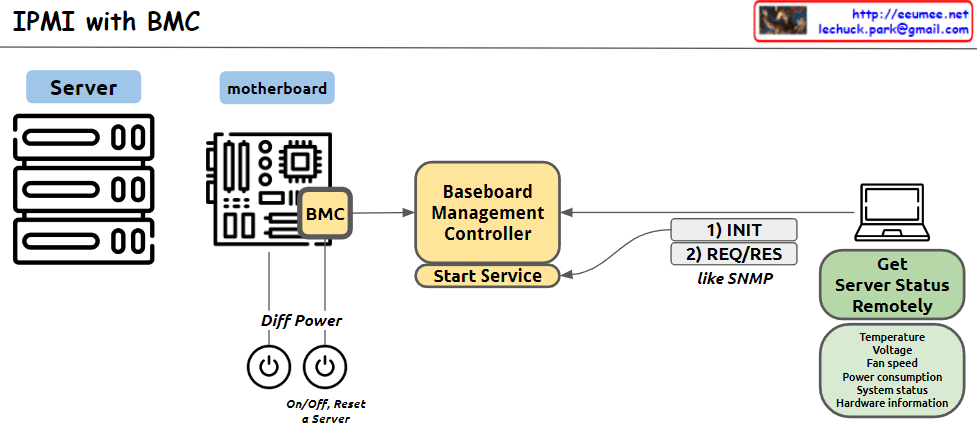
This image illustrates the structure of an IPMI (Intelligent Platform Management Interface) system using BMC (Baseboard Management Controller). The main components and functions are as follows:
- Server: Represents the managed server.
- Motherboard: Depicts the server’s mainboard, where the BMC chip is located.
- BMC (Baseboard Management Controller): The core component for monitoring and managing server hardware.
- Baseboard Management Controller: Performs the main functions of the BMC, with a “Start Service” function indicated.
- Diff Power: Represents the server’s power management functions, including On/Off and Reset capabilities.
- Remote management computer: Used to remotely monitor and manage the server status.
- Get Server Status Remotely: Server status information that can be checked remotely, including temperature, voltage, fan speed, power consumption, system status, and hardware information.
- Communication process: The interaction between the remote computer and BMC is shown to involve 1) INIT (initialization) and 2) REQ/RES (request/response) stages, described as functioning similar to SNMP.
This system allows administrators to remotely monitor and control the physical state of the server.
 Lechuck Park