Hub/Switch/Router

From ChatGPT with some prompting
The image appears to be an educational diagram explaining the basic functions and differences between three types of network devices: hubs, switches, and routers. Here’s what the image indicates about each device:

  • Hub: A hub is a simple networking device that broadcasts all incoming data packets to every connected device, regardless of the destination MAC address. It’s depicted as sending the same data to devices A, B, C, and D.
  • Switch: Unlike a hub, a switch is intelligent enough to filter and forward data packets based on their destination MAC addresses. This means it only sends the data to the specific device it is intended for, improving network efficiency and reducing collisions.
  • Router: A router operates at a higher level than switches and hubs. It routes data packets not just based on MAC addresses but also using IP addresses. It can connect multiple networks and manage the data traffic between them using protocols like BGP (Border Gateway Protocol).

The note at the bottom of the image states that the functions of these devices are not completely separated, and higher-level equipment includes the functions of the lower-level equipment. This means routers can perform the functions of switches, which in turn can perform the functions of hubs.

From Gemini with some prompting
The image is a diagram of a network consisting of hubs, switches, and routers. The functions of each device are as follows:

Hub: A hub is a central device that connects network devices. All devices connected to a hub can communicate with each other. When a hub receives a data frame, it transmits it to all ports.

Switch: A switch is similar to a hub, but it only transmits data to the device connected to each port. A switch uses MAC addresses to determine which port to transmit a data frame to.

Router: A router is a device that connects two or more networks. A router uses IP addresses to determine which network to transmit a data packet to.
In the image, each device is connected as follows:

  • Computers A, B, C, D: Each computer is connected to a hub or switch.
  • Hub: The hub is connected to a switch.
  • Switch: The switch is connected to a router.

The image also includes a description of the type of data that each device handles:

  • Hub: The hub transmits all data frames to all ports.
  • Switch: The switch uses MAC addresses to determine which port to transmit a data frame to.
  • Router: The router uses IP addresses to determine which network to transmit a data packet to.

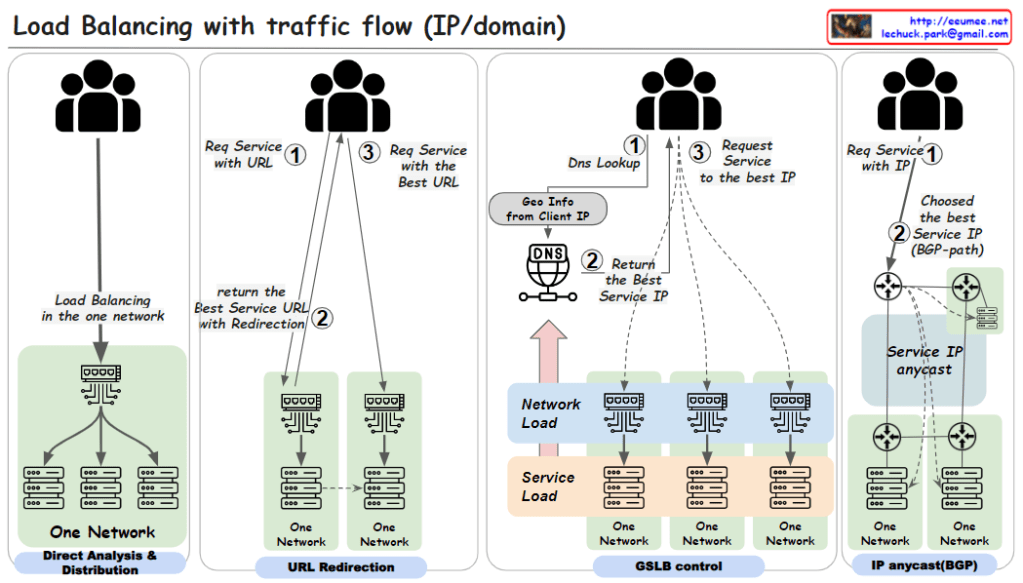
Load balancing with traffic flow

From ChatGPT with some prompting

  1. Direct Analysis & Distribution within One Network:
    • This method involves load balancing within a single network using a load balancing switch. The user requests a service via a URL (step 1). The load balancing is handled internally by the switch, which directly analyzes traffic and distributes the load to various servers within the network.
  2. URL Redirection:
    • Here, a user requests a service using a URL (step 1). The network then uses URL redirection to guide the user to the best service URL (step 2), which may involve multiple redirections within one network until the most optimal service endpoint is selected for the user (step 3).
  3. GSLB (Global Server Load Balancing) Control:
    • In this approach, the user starts with a DNS lookup when requesting a service (step 1). The DNS uses the geographic information from the client’s IP to return the best service IP (step 2). The user then requests the service at the given IP address (step 3). This method uses global considerations such as network and service load to balance traffic across multiple networks.
  4. IP Anycast with BGP (Border Gateway Protocol):
    • Users request a service directly using an IP address (step 1). The best service IP is determined via the BGP, which routes traffic based on the shortest available path (step 2). With IP anycast, the user is automatically directed to the nearest or most appropriate service location based on network routing protocols.

Each of these methods is designed to distribute network traffic efficiently. The goal is to ensure service reliability and performance, optimize server use, and improve the overall user experience by reducing latency.

BGP Flow

From Gemini with some prompting
Example Presentation Script

  1. BGP Session Overview

Hello everyone. Today, we will delve into the details of the BGP session establishment process. BGP is an internet routing protocol that facilitates the exchange of routing information between different autonomous systems. Establishing a stable BGP session is critical for efficient traffic forwarding across the internet.

  1. TCP Connection Establishment

A BGP session commences with a TCP 3-way handshake on port 179. After establishing a reliable connection, the session proceeds to the Open message exchange phase to negotiate the fundamental parameters for the BGP session.

  1. Open Message Exchange and Keepalive Message Exchange

The Open message exchange establishes BGP parameters such as version, autonomous system number, and Hold Timer. Hold Timer defines the session’s inactivity timeout. Keepalive messages maintain the connection by periodically exchanging messages. If no Keepalive message is received within the Hold Time, the session terminates.

  1. Update Message Transmission and Path Selection

The core of the BGP session lies in the Update message transmission. Update messages contain new, modified, or withdrawn routing information. They include network, next hop, and path attribute information, enabling routing table updates and optimal path selection.

  1. Withdrawal Message and Loop Prevention

Obsolete routing information is announced through Withdrawal messages and subsequently removed from the routing table. AS path information prevents routing loops and allows each AS to control the exchanged routing information.

  1. Conclusion

The BGP session establishment process comprises TCP connection establishment, Open message exchange, Keepalive message exchange, Update message transmission, path selection, Withdrawal message, loop prevention, and policy enforcement. This process ensures a stable BGP session and facilitates efficient routing information exchange.

OSPF & BGP

from DALL-E with some prompting
The image is an illustrative diagram explaining the interaction between two key protocols used in networking: OSPF (Open Shortest Path First) and BGP (Border Gateway Protocol).

  • In the center, we have a network labeled “AS (Autonomous System)” which is a collection of connected IP routing prefixes under the control of one or more network operators that presents a common, clearly defined routing policy to the internet.
  • Within the AS, the diagram shows a smaller network with purple lines connecting different nodes (routers), representing the OSPF protocol. OSPF is an interior gateway protocol used within an AS that distributes routing information between routers belonging to a single Autonomous System. The key features listed are:
    • “Sharing Link State (broadcast)” which means OSPF routers send link state advertisements to share the state of each directly connected link.
    • “with a Bandwidth” indicates that OSPF takes bandwidth into account when calculating the best route.
    • “Find Short Path (Dijkstra)” refers to OSPF using Dijkstra’s algorithm to find the shortest path through the network based on the cumulative cost of reaching each node.
  • On the right side of the diagram, there’s a larger network outlined in red, with blue lines connecting to a central node. This represents the BGP protocol, which is used between different ASes, especially at the borders. The features listed for BGP are:
    • “Border (of the AS) Gateway” which is the point where an AS connects to another AS.
    • “Sharing Routing Table between Border Gateways” means that BGP is responsible for exchanging routing information between autonomous systems, allowing them to see each other’s networks and determine the best paths.

The diagram uses solid lines to denote direct connections and dashed lines for indirect connections. The interplay between OSPF and BGP is critical for the overall functioning of the internet, with OSPF managing routes within an AS and BGP managing routes between ASes.

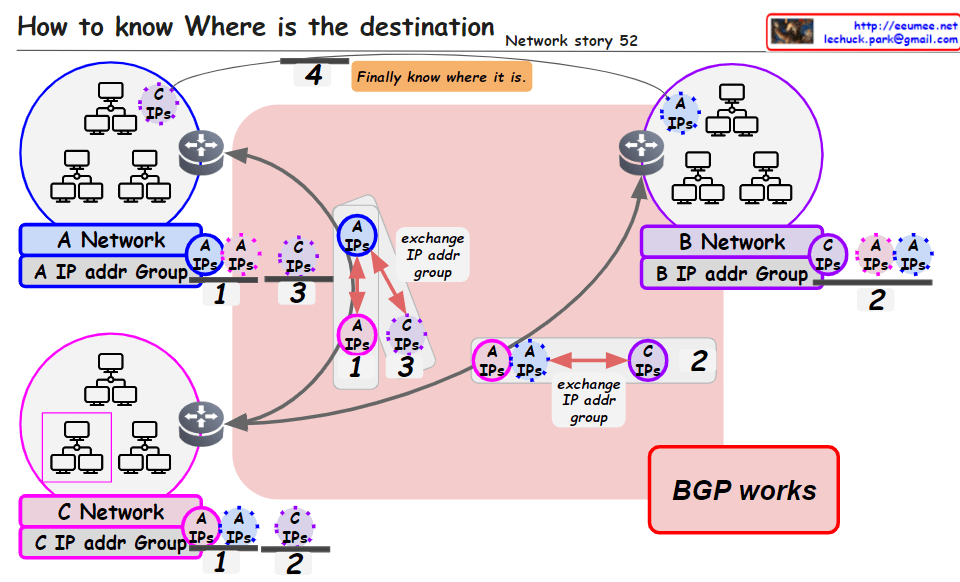
Where it is?

From Bard with some prompting

1. The sender sends a packet using the destination IP address.

2. Routers use the destination IP address to determine the path to forward the packet.

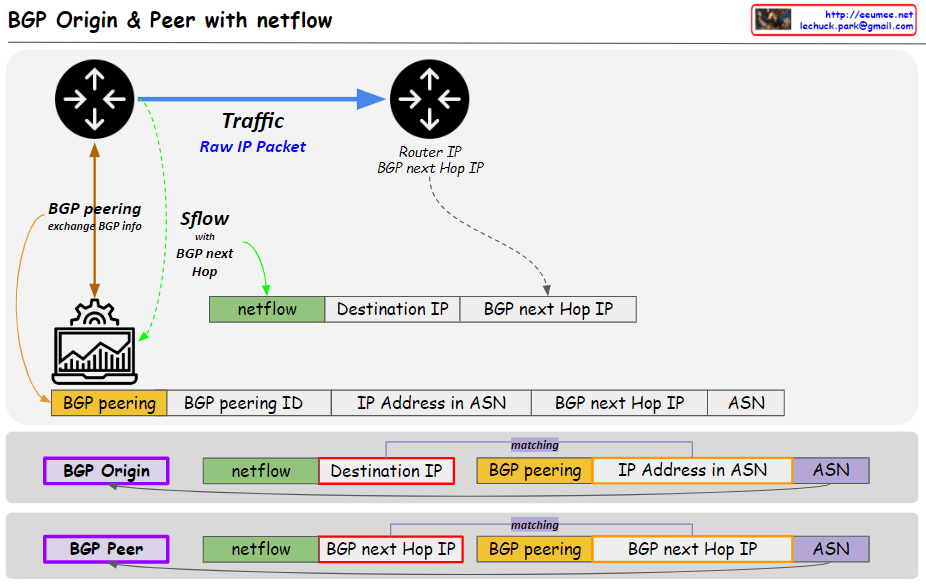
3. Routers use the BGP protocol to share routing information with other routers.

4. The packet travels through multiple routers until it reaches the destination network.

5. The router in the destination network uses the destination IP address to forward the packet to the destination host.

6. The destination host receives and processes the packet.

Note:

  • This summary only explains the basic concepts, and the actual network environment can be more complex.
  • For more information, please refer to networking books or websites.


Overall IP Network

From DALL-E with some prompting
The image is a diagram explaining the overall structure and data flow of an IP network.

Overall IP network: The entire structure of an IP network
Ethernet In the LAN: Ethernet used within the Local Area Network (LAN)
Identification in the internet: Identifying devices on the internet
OSPF short path with IP addresses: Open Shortest Path First (OSPF) routing protocol finds the shortest path using IP addresses
Addressing/Routing to the peer: Assigning addresses and routing to peer devices
BGP to get/share IP (other & me): Border Gateway Protocol (BGP) is used for obtaining and sharing IP addresses between others and oneself
Service Connection: Establishing a service connection
IP address ↔ Domain address: The relationship between IP addresses and domain addresses
DNS Easy to keep an internet address by Domain name: Domain Name System (DNS) makes it easy to maintain an internet address by using domain names
On TCP/UDP: Operating on TCP (Transmission Control Protocol) and UDP (User Datagram Protocol)
The diagram illustrates how data moves within a network. For instance, when a user accesses web services using the HTTP protocol, the DNS translates domain names into IP addresses, and then a service connection is established using the IP address over TCP/UDP protocols. Routing protocols such as OSPF and BGP are used to find the optimal path for data transmission through internal networks and the wider internet, respectively.