Transmission Rate vs Propagation Speed

Key Concepts

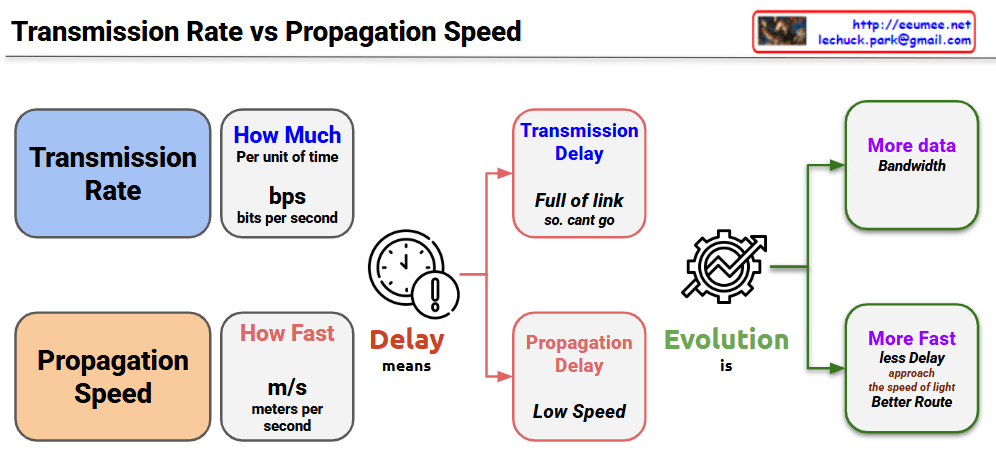
Transmission Rate

  • Amount of data processable per unit time (bps – bits per second)
  • “Processing speed” concept – how much data can be handled simultaneously
  • Low transmission rate causes Transmission Delay
  • “Link is full, cannot send data”

Propagation Speed

  • Speed of signal movement through physical media (m/s – meters per second)
  • “Travel speed” concept – how fast signals move
  • Slow propagation speed causes Propagation Delay
  • “Arrives late due to long distance”

Meaning of Delay

Two types of delays affect network performance through different principles. Transmission delay is packet size divided by transmission rate – the time to push data into the link. Propagation delay is distance divided by propagation speed – the time for signals to physically travel.

Two Directions of Technology Evolution

Bandwidth Expansion (More Data Bandwidth)

  • Improved data processing capability through transmission rate enhancement
  • Development of high-speed transmission technologies like optical fiber and 5G
  • No theoretical limits – continuous improvement possible

Path Optimization (More Fast, Less Delay)

  • Faster response times through propagation delay improvement
  • Physical distance reduction, edge computing, optimal routing
  • Fundamental physical limits exist: cannot exceed speed of light (c = 3×10⁸ m/s)
  • Actual media is slower due to refractive index (optical fiber: ~2×10⁸ m/s)

Network communication involves two distinct “speed” concepts: Transmission Rate (how much data can be processed per unit time in bps) and Propagation Speed (how fast signals physically travel in m/s). While transmission rate can be improved infinitely through technological advancement, propagation speed faces an absolute physical limit – the speed of light – creating fundamentally different approaches to network optimization. Understanding this distinction is crucial because transmission delays require bandwidth solutions, while propagation delays require path optimization within unchangeable physical constraints.

With Claude

TCP BBR

From ChatGPT with some prompting
Overview of TCP BBR:

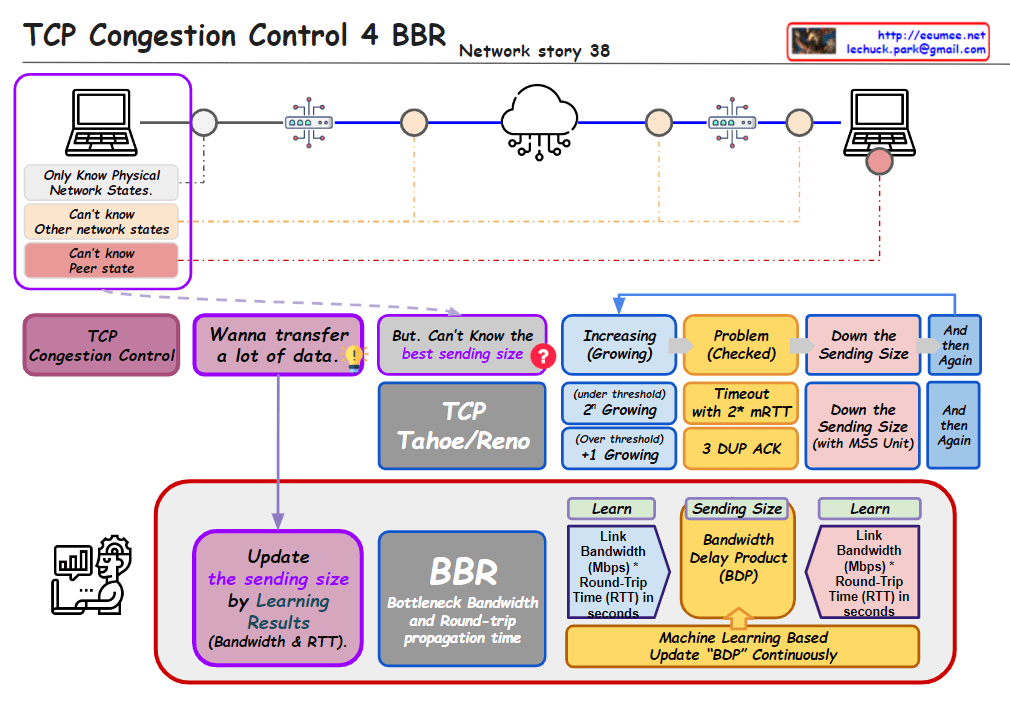
  • TCP BBR optimizes network performance using Bottleneck Bandwidth and Round-trip time (RTT).
  • Speed is determined by RTT.
  • Bandwidth is determined by Bottleneck Bandwidth.

Learning Process:

  • Every ACK:
    • Updates the bottleneck bandwidth.
    • Tracks the minimum observed RTT value.
  • Every RTT:
    • Adjusts the sending size (n * MSS) and the pacing rate (the rate at which data is sent).

Sending Size Update:

  • BBR continuously updates the sending size (how many MSS to send) based on the current network conditions.

In summary, TCP BBR learns the network conditions by monitoring the bottleneck bandwidth and RTT, and accordingly adjusts the sending size and pacing rate to optimize data transmission, reducing congestion and improving performance.

TCP Reliable 3

From Claude with some prompting
RTT is measured by sending a packet (SEQ=A) and receiving an acknowledgment (ACK), providing insights into network latency. Bandwidth is measured by sending a sequence of packets (SEQ A to Z) and observing the amount of data transferred based on the acknowledgment of the last packet.

This image explains how to measure round-trip time (RTT) and bandwidth utilization to control and optimize TCP (Transmission Control Protocol) communications. The measured metrics are leveraged by various mechanisms to improve the reliability and efficiency of TCP.

These measured metrics are utilized by several mechanisms to enhance TCP performance. TCP Timeout sets appropriate timeout values by considering RTT variation. TIMELY provides delay information to the transport layer based on RTT measurements.

Furthermore, TCP BBR (Bottleneck Bandwidth and Round-trip propagation time) models the bottleneck bandwidth and RTT propagation time to determine the optimal sending rate according to network conditions.

In summary, this image illustrates how measuring RTT and bandwidth serves as the foundation for various mechanisms that improve the reliability and efficiency of the TCP protocol by adapting to real-time network conditions.

MTU & MSS

From Copilot with some prompting
Certainly! Let’s clarify the distinct purposes of MTU (Maximum Transfer Unit) and MSS (Maximum Segment Size):

  1. MTU (Maximum Transfer Unit):
    • Associated with Ethernet, MTU represents the maximum size of an Ethernet frame.
    • When data is transmitted over a network, it is divided into smaller packets (frames). MTU defines the largest size a frame can be.
    • If a frame exceeds the MTU, it will be fragmented by the outgoing network device.
    • MTU optimization aims to efficiently share network bandwidth.
  2. MSS (Maximum Segment Size):
    • Associated with TCP (Transmission Control Protocol), MSS controls the flow of data within a TCP session.
    • It specifies the largest amount of data that can be sent in a single TCP segment.
    • The sender determines how many MSS units are sent at a given time.
    • MSS plays a crucial role in TCP congestion control and affects the TCP window size.

In summary, MTU focuses on frame size in the Ethernet layer, while MSS governs data segmentation and flow control in the TCP layer.