Traceroute

From Claude with some prompting
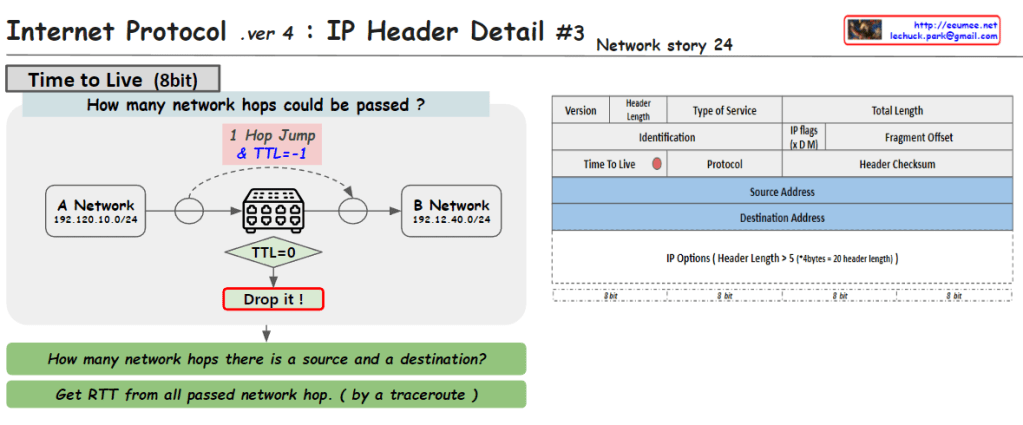
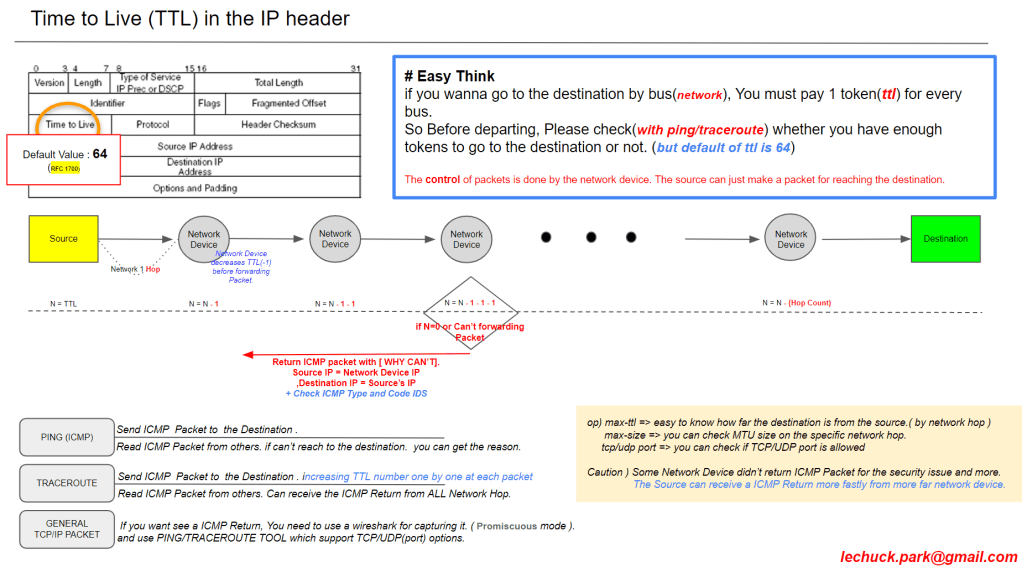
This image explains the concept of “Traceroute: First Send, First Return?” for the traceroute utility in computer networking. Traceroute sends IP packets with increasing Time-to-Live (TTL) values, starting from TTL=1, 2, 3, and so on. When the TTL reaches 0 at a network hop, that hop returns an ICMP (Internet Control Message Protocol) message back to the source.

However, the order in which the response packets are received at the source may differ from the order in which they were sent, primarily due to two reasons:

  1. Generation of ICMP response packets is a CPU task, and it can be delayed due to CPU settings or other processing priorities, causing a delay in the response.
  2. The ICMP response packets can take multiple paths to return to the source, as indicated by the text “Packet replies can use multiple paths” in the image. This means that responses can arrive at different times depending on the route taken.

As a result, when analyzing traceroute results, it is essential to consider not only the TTL sequence to determine the network hops but also factors like response times and paths taken by the responses.

The potential delay in ICMP packet generation by the CPU and the use of multiple return paths can cause the actual response order to differ from the sending order in traceroute.

Understanding that the response order may not strictly follow the sending order due to CPU processing delays and the use of multiple return paths is crucial when interpreting traceroute results.

Traceroute works 2

From DALL-E with some prompting
The image provides a detailed explanation of the ‘traceroute’ network diagnostic tool and how it functions, along with potential error messages and their meanings. The ‘traceroute’ command can work with not only ICMP but also TCP/UDP protocols, allowing it to trace the path data packets take through a network to reach the destination. Specifically, the command ‘traceroute -T -p 80 [destination]’ is used to trace the route to the destination over TCP port 80.

The diagram displays several routers (labeled 1, 2, 3, 4) that the traceroute may encounter on its path. Accompanying these are four cases, each illustrating a different error scenario that might occur during the trace:

  • Case1: A TCP block might occur, potentially due to a firewall or Access Control List (ACL), indicated by ICMP Type 3, Code 2 (Protocol Unreachable) or Code 10 (Communication with Destination Host is Administratively Prohibited).
  • Case2: A block on TCP Port 80 might be encountered, also possibly because of a firewall or ACL.
  • Case3: A general TCP block, which might be caused by iptables or similar tools, indicated by ICMP Type 3, Code 2 (Protocol Unreachable) or Code 13 (Communication Administratively Prohibited).
  • Case4: A block on TCP Port 80 or a service not being open on the destination, which can result in messages such as “Port Unreachable” or “Connection Refused”.

Each case provides the relevant ICMP message type and code that might be returned if such a situation occurs, which is crucial for network administrators or IT professionals in diagnosing and resolving network connectivity issues.

Traceroute works I

From The Bard with some prompting
The image is a diagram of how a traceroute works. Traceroute is a tool that uses ICMP packets to determine the path that a packet takes from a source to a destination.

The image shows the following steps:

The source sends an ICMP packet with a TTL (time to live) of 1.
The first router that receives the packet decrements the TTL by 1 and sends it to the next router.
If the TTL reaches 0 before reaching the destination, the router sends an ICMP packet back to the source with an error message.
The source then sends an ICMP packet with a TTL of 2.
The process repeats until the destination is reached.
The text in the image provides additional information about each step. For example, the text for step 1 states that the source sends an ICMP packet with a TTL of 1. This means that the packet will be discarded by any router that receives it after it has traveled 1 hop.

The image also shows the following information:

  • The source IP address is 192.168.1.1.
  • The destination IP address is 203.0.113.5.
  • The RTT (round-trip time) for each hop is shown in milliseconds.

The image is a useful tool for understanding how traceroute works. It can be used to troubleshoot network problems by identifying the routers that are causing delays or errors.

Here is a more concise summary of the image:

Traceroute uses ICMP packets to determine the path that a packet takes from a source to a destination. The source sends an ICMP packet with a TTL of 1. If the TTL reaches 0 before reaching the destination, the router sends an ICMP packet back to the source with an error message. The source then sends an ICMP packet with a TTL of 2. The process repeats until the destination is reached.tunesharemore_vertadd_photo_alternate