Web Socket

with a Claude’s help
The image is a diagram that explains the differences between HTTP (Hypertext Transfer Protocol) and WebSocket communication. Let me summarize the key points:

  1. HTTP REQ/RES (Request/Response):
    • The request is sent from the client (laptop icon) to the server (globe icon).
    • The response is sent back from the server to the client.
    • The <Req> and <Res> are separate connections, and the communication is bi-directional (one connection only).
    • All data is transferred via the HTTP protocol payload.
  2. WebSocket:
    • The WebSocket is established between the client (laptop icon) and server (globe icon).
    • The <Req> and <Res> are working in one connection, which is bi-directional.
    • Data Transferring is working on a socket (not HTTP Req/Res).
    • A TCP socket is commonly used for WebSocket data transfer.
    • WebSocket data transfer is described as “light & fast Transmission (more real time)”.

Overall, the diagram illustrates the differences between the traditional HTTP request-response model and the WebSocket communication, which provides a more efficient, real-time data transfer mechanism.

HTTP caching

From Claude with some prompting
The image illustrates the architecture of an HTTP caching system with the following main components:

  1. Client Side (Left):
  • Web App client
  • FAST GET requests through PROXY
  • Uses If-Modified-Since and Cache-Control headers
  1. Central Infrastructure:
  • GSLB (Global Server Load Balancer)
  • CDN Service (Content Delivery Network)
  • Edge servers (distributed cache servers)
  1. Server Side (Right):
  • Web Service server
  • FAST RETURN through REVERSE PROXY
  • Uses Last-Modified and Cache-Control headers
  • Supports Load Optimization
  • Origin server connection
  1. Cache Control Options:
  • max-age
  • no-cache
  • no-store
  • must-revalidate
  • public
  • private
  • s-maxage

This architecture represents an enterprise-grade caching system designed to optimize web performance and reduce server load. The system utilizes multiple layers of caching with CDN to deliver content to end users more quickly and efficiently.

Traffic flow starts from the client, passes through multiple caching layers, and can ultimately reach the origin server, with appropriate caching strategies applied at each layer.

This structure enables:

  • Improved response times
  • Reduced server load
  • Efficient content delivery
  • Better user experience
  • Scalable infrastructure

The combination of proxies, CDN, and various caching mechanisms creates a robust system for handling web content delivery at scale.

Web Service [Server Inside]

From Claude with some prompting
focusing on the key technical aspects and operational considerations for designing a web service application.

Web Service [Server Inside] – Design and Operational Considerations

  1. Service Architecture Design: a. Multi-tier structure:
    • Gateway → Load Balancer → API Gateway → DB Proxy → Database
    • Each layer focuses on specific functions, improving maintainability and scalability b. Microservice Architecture:
    • Implemented through “Programmatic Control” at the API Gateway
    • Ensures service independence, increases development and deployment flexibility
  2. Scalability Design: a. Auto Scaling:
    • Applied at each layer (Load Balancer, API Gateway, DB Proxy)
    • Automatic resource adjustment based on traffic fluctuations for improved stability b. Resource Pooling:
    • “Protecting SVC” functionality for efficient resource management c. Load Balancing:
    • Gateway provides “Route with Load Balancing (2 More Resources)” functionality
  3. Performance Optimization: a. Static/Dynamic Data Separation:
    • Static Data Control: HTML/CSS/JS/IMAGES
    • Utilization of CDN services or On-Premise storage b. Database Optimization:
    • SQL, NoSQL, Hybrid options available
    • Connection management through DB Proxy for database load distribution
  4. Security Design: a. Multi-layered Security:
    • Authentication (OAuth2, etc.)
    • Encryption (SSL/TLS)
    • Firewall/WAF/IPS/IDS b. Request Limiting:
    • “Limiting Requests (Protect Domain Service)” at Gateway for DDoS protection
  5. Monitoring and Analysis: a. Comprehensive Monitoring:
    • Collection of Network, Server, and Application Metrics b. Analysis and Planning:
    • Maintenance & Scaling
    • Service Design Upgrade
    • Resource & Cost Optimization
  6. Error Handling:
    • Specification of 400, 500 series errors (Network Error, Service Unavailable, Server Internal, etc.)
    • Emphasis on Gateway-related errors (502 Bad Gateway, 504 Gateway Timeout)
  7. Network and Protocol:
    • “Protocol Converting” functionality provided at the Gateway
    • Separate management of Network Domain Control
  8. Operational Efficiency:
    • Automation: Minimized manual intervention through Auto Scaling, resource pooling, etc.
    • Flexibility: Possible combination of On-Premise and CDN services
    • Cost Optimization: Efficient resource usage, continuous analysis and improvement

Key Advantages of This Configuration:

  1. High Availability and Stability: Stable service provision through multiple layers and auto-scaling
  2. Excellent Scalability: Flexible response to traffic fluctuations
  3. Strong Security: Multi-layered security structure to address various threats
  4. Efficient Resource Management: Cost efficiency through automation and optimization
  5. Flexible Service Development and Deployment: Utilization of microservice architecture
  6. Comprehensive Monitoring and Analysis: Enables continuous service improvement

This design incorporates almost all essential elements required for modern, large-scale web services, enabling stable and scalable service operations. It reflects a thorough consideration of both technical and operational aspects, providing a robust foundation for complex web applications.

Domain to IP

From Claude with some prompting
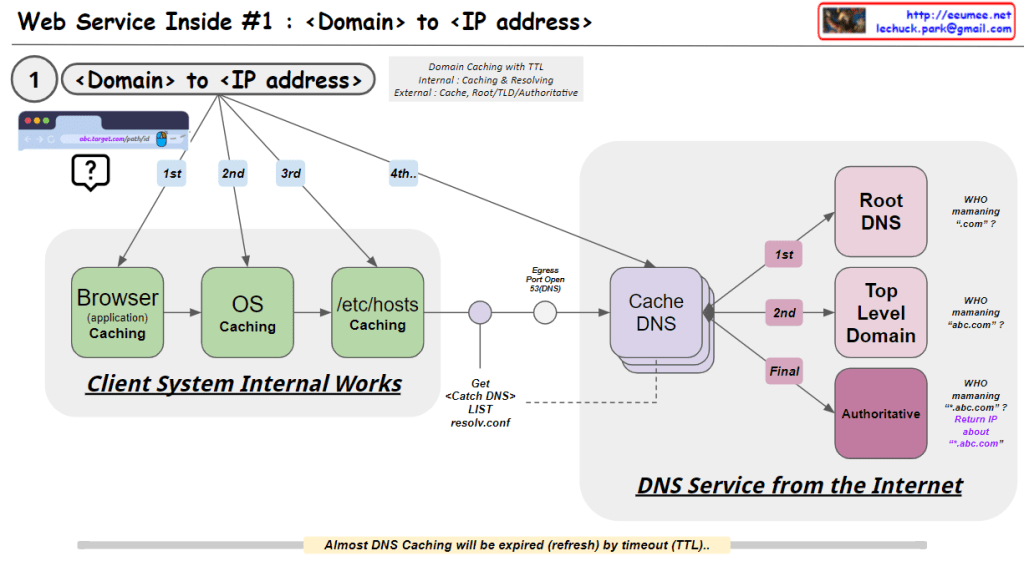
This image illustrates the process of converting a domain name to an IP address, which is the first step in web service operations. Here’s a breakdown of the image:

  1. Client System Internal Works:
    • Browser (application) Caching: The first level of caching occurs in the web browser.
    • OS Caching: The second level of caching is at the operating system level.
    • /etc/hosts Caching: The third level involves checking the local hosts file.
  2. DNS Service from the Internet:
    • Cache DNS: This is the first point of contact with external DNS services.
    • Root DNS: Manages top-level domains like “.com”.
    • Top Level Domain: Manages specific top-level domains (e.g., “.com”, “.org”).
    • Authoritative DNS: Provides the final, authoritative IP address for the specific domain.

The process follows a hierarchical order:

  1. Check Browser cache
  2. Check OS cache
  3. Check /etc/hosts file
  4. Query Cache DNS server
  5. If not found, Cache DNS queries Root DNS
  6. Then queries Top Level Domain
  7. Finally queries Authoritative DNS to get the IP address

The image also notes:

  • DNS caching uses TTL (Time To Live) for expiration.
  • The system uses a resolve.conf file to get the Cache DNS list.
  • It questions who is managing various levels of DNS (“.com”, “abc.com”, etc.)

This process ensures efficient and hierarchical resolution of domain names to IP addresses, utilizing various caching mechanisms to improve speed and reduce network load.

HTTP Changes

From Claude with some prompting
HTTP: HTTP uses text-based HTML with a head and body structure. HTTP/1.1 introduced Keep-Alive for maintaining TCP connections, but suffers from header overhead and Head-of-Line Blocking issues. Servers cannot push data without a client request.

HTTP/2: HTTP/2 introduced binary framing to improve performance. It enhances efficiency through header compression and multiplexing, and added server push functionality. It also strengthened authentication and encryption using TLS/SSL.

HTTP/3: HTTP/3 operates over the QUIC protocol using UDP instead of TCP. It includes TLS 1.3 by default and provides lower latency and improved multiplexing. HTTP/3 significantly enhances performance through 0-RTT connection establishment, elimination of TCP handshakes, and solving Head-of-Line Blocking issues. It also offers reliable data streams over UDP and ensures data ordering on each stream.

HTTP Service components

From Claude with some prompting
This image illustrates the network structure of an HTTP service. The main components are:

Client Side:

  • Browser: Handles URL requests, HTML parsing, and JavaScript execution
  • OS: Runs the browser, translates URL (domain) to IP

Internet:

  • DNS: Converts domain names to IP addresses
  • IP: Transfers data using IP addresses

Server Side:

  • OS (Operating System): Runs applications, manages IP network
  • TLS: Handles encryption
  • WEB:
    • Manages HTML embedding
    • Handles JSP (JavaServer Pages)
    • Typically deals with static content and some dynamic content generation
  • WAS (Web Application Server):
    • Handles server-side programming and application logic
    • Manages complex dynamic content generation
    • Interacts with the database
    • Handles business logic of the application
  • DB: Database for storing and retrieving data for web services

The diagram shows the entire process of how an HTTP request is handled, from the web browser to the server’s database. It briefly explains the technologies and protocols involved at each step, providing a helpful overview of the basic structure of web services.

HTTP something

From Claude with some prompting
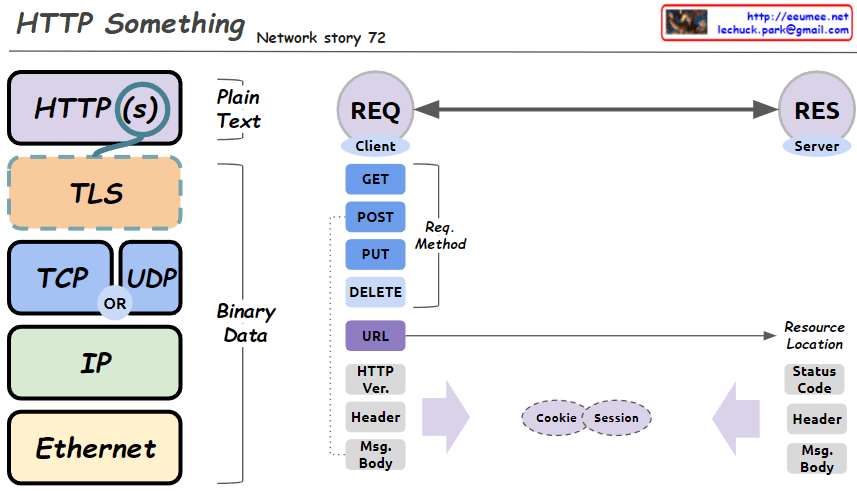
This image is a diagram explaining the structure of HTTP (Hypertext Transfer Protocol) and related network protocols. The main components are:

  1. Protocol Stack:
    • HTTP(S)
    • TLS (Transport Layer Security)
    • TCP (Transmission Control Protocol) or UDP (User Datagram Protocol)
    • IP (Internet Protocol)
    • Ethernet
  2. Data Types:
    • Plain Text: At HTTP(S) and TLS levels
    • Binary Data: From TCP/UDP down to Ethernet
  3. Communication between Client (REQ) and Server (RES):
    • Request Methods: GET, POST, PUT, DELETE
    • URL (Resource Location)
    • HTTP Version
    • Headers
    • Message Body
  4. Cookies and Sessions: Mechanisms for exchanging information between client and server
  5. Server Response:
    • Status Code
    • Headers
    • Message Body

This diagram provides a simplified view of the basic structure of HTTP requests and responses, as well as the underlying network protocol layers that support them. It visually explains the fundamental principles of web communication.