/proc in Linux

I love /proc directory. because you can find almost work inside a Linux Operating system.
  • nubmer is process_id -> in that directory, you can check process status.
  • ex) How many files opened in specific process (with process-id) ? ‘fd’
  • ex) memory usage detailed ‘mem’ and…

Too many, so find it by yourself via googling 🙂
interrupt and ksoftirqd

In linux, The procedure of interrupts is divided by  The Top half and The Bottom half.

  • Top half
    • mainly transfer data to repository for processing data like calling API with parameter in the programming.
    • on example, network card received packet , and then will trigger proper interrupt after storing packet data at memory somewhere in the NIC.
    • Uninterruptible by OS.
  • Bottom half
    • working .. working ..
    • can be interruptible.
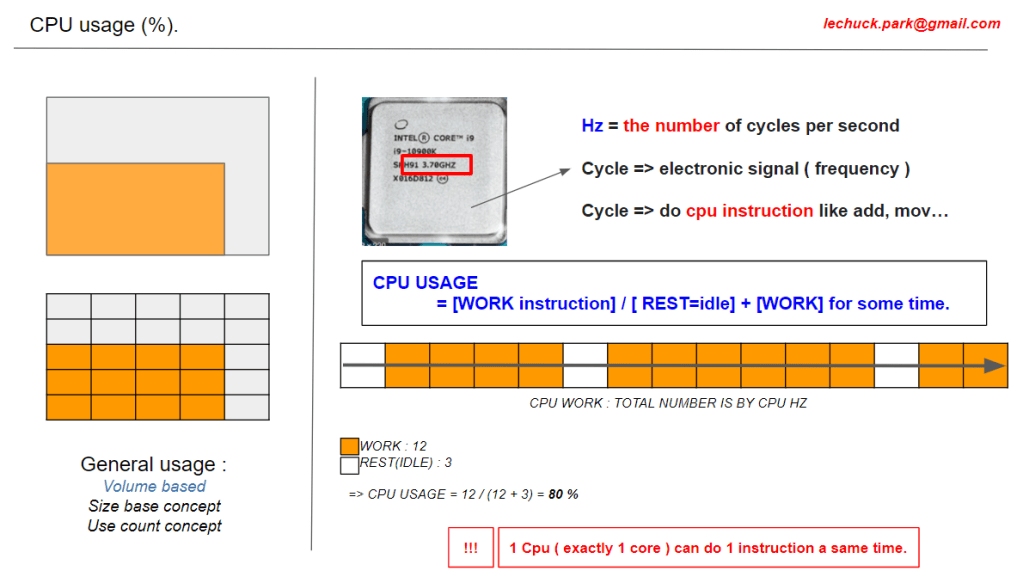
      • ksoftirq calls when bottom half is too long to process queued other interrupts(the top half).
      • You can see that ksoftirqd keep CPU high when the bottom half which run too long time is working .


(further) need to explain with kernel source.

Did you see TCP Window zero..case?

As you know, TCP use buffer to arrange received Data from other peer every each TCP connection. and at that time, TCP windows is for notification to other peer about available buffer size right now for itself TCP connection.

Sometime you can see TCP Window = zero packet when you analysis raw packet with wireshark like..

I am Sure These below is not all case for TCP window Zero.. but when I get a new idea. I will update this writes.

  1. Too Many Request .. Server cant process received request right now.
    1. so send TCP Window zero…for notify ” PLZ dont send packet anymore.. wait!!”
  2. Too Delay(Problem) on Network State for this TCP connection.
    1. Big Sequence number.. but I didn’t get former sequence packet.
      1. network problem or threat… It can’t be avoid .. on TCP Protocol..

and link…..

https://wiki.wireshark.org/TCP%20ZeroWindow