OOM (Out-of-Memory) Works

OOM (Out-of-Memory) Mechanism Explained

This diagram illustrates how the Linux OOM (Out-of-Memory) Killer operates when the system runs out of memory.

Main Process Flow (Left Side)

  1. Request
    • An application requests memory from the system
  2. VM Commit (Reserve)
    • The system reserves virtual memory
    • Overcommit policy allows reservation beyond physical capacity
  3. First Use (HW mapping) → Page Fault
    • Hardware mapping occurs when memory is actually accessed
    • Triggers a page fault for physical allocation
  4. Reclaim/Compaction
    • System attempts to free memory through cache, SLAB, writeback, and compaction
    • Can be throttled via cgroup memory.high settings
  5. Swap (if enabled)
    • Uses swap space if available and enabled
  6. OOM Killer
    • As a last resort, terminates processes to free memory

Detailed Decision Points (Center & Right Columns)

Memory Request

  • App asks for memory
  • Controlled via brk/sbrk, mmap/munmap, mremap, and prlimit(RLIMIT_AS)

Virtual Address Allocation

  • Overcommit policy allows reservation beyond physical limits
  • Uses mmap (e.g., MAP_PRIVATE) with madvise(MADV_WILLNEED) hints

Physical Memory Allocation

  • Checks if zone watermarks are OK
  • If yes, maps a physical page; if no, attempts reclamation
  • Optional: mlock/munlock, mprotect, mincore

Any Other Free Memory Space?

  • Attempts to free memory via cache/SLAB/writeback/compaction
  • May throttle on cgroup memory.high
  • Hints: madvise(MADV_DONTNEED)

Swap Space?

  • Checks if swap space is available to offload anonymous pages
  • System: swapon/swapoff; App: mlock* (to avoid swap)

OOM Killer

  • Sends SIGKILL to selected victim when below watermarks or cgroup memory.max is hit
  • Victim selection based on badness/oom_score_adj
  • Configurable via /proc/<pid>/oom_score_adj and vm.panic_on_oom

Summary

When an app requests memory, Linux first reserves virtual address space (overcommit), then allocates physical memory on first use. If physical memory runs low, the system tries to reclaim pages from caches and swap, but when all else fails, the OOM Killer terminates processes based on their oom_score to free up memory and keep the system running.


#Linux #OOM #MemoryManagement #KernelPanic #SystemAdministration #DevOps #OperatingSystem #Performance #MemoryOptimization #LinuxKernel

With Claude

Memory Bound

This diagram illustrates the Memory Bound phenomenon in computer systems.

What is Memory Bound?

Memory bound refers to a situation where the overall processing speed of a computer is limited not by the computational power of the CPU, but by the rate at which data can be read from memory.

Main Causes:

  1. Large-scale Data Processing: Vast data volumes cause delays when loading data from storage devices (SSD/HDD) to DRAM
  2. Matrix Operations: Large matrices create delays in fetching data between cache, DRAM, and HBM (High Bandwidth Memory)
  3. Data Copying/Moving: Data transfer waiting times on the memory bus even within DRAM
  4. Cache Misses: When required data isn’t found in L1-L3 caches, causing slow main memory access to DRAM

Result

The Processing Elements (PEs) on the right have high computational capabilities, but the overall system performance is constrained by the slower speed of data retrieval from memory.

Summary:

Memory bound occurs when system performance is limited by memory access speed rather than computational power. This bottleneck commonly arises from large data transfers, cache misses, and memory bandwidth constraints. It represents a critical challenge in modern computing, particularly affecting GPU computing and AI/ML workloads where processing units often wait for data rather than performing calculations.

With Claude

OOM Killer

OOM (Out-of-Memory) Killer

This diagram explains the Linux OOM Killer mechanism:

  1. Memory Request Process:
    • A process requests memory allocation from the operating system.
    • It receives a handler for the allocated memory.
  2. Memory Management System:
    • The operating system manages virtual memory.
    • Virtual memory utilizes physical memory and disk swap space.
    • Linux allows memory overcommitment.
  3. OOM Killer Operation:
    • When physical memory becomes scarce, the OOM Killer is initiated.
    • The OOM Killer selects and terminates “less important” processes based on factors such as memory usage and process priority.
    • This mechanism maintains the overall stability of the system.

Linux OOM Killer is a mechanism that automatically activates when physical memory becomes scarce. It maintains system stability by selecting and terminating less important processes based on memory usage and priority.

With Claude

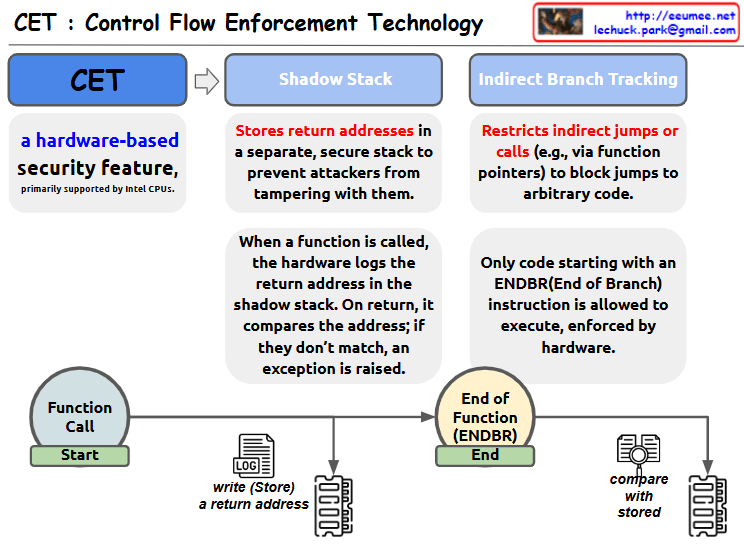
Control Flow Enforcement Tech.

This image is an illustrative diagram of Control Flow Enforcement Technology (CET). CET is a hardware-based security feature, primarily supported by Intel CPUs.

The diagram shows the two main mechanisms of CET:

  1. Shadow Stack:
  • Stores the return address on a separate, secure stack to prevent an attacker from changing it.
  • When a function is called, the hardware writes the return address to the shadow stack.
  • When the function returns, the address on the stack is compared to the address on the shadow stack, and an exception is thrown if they don’t match.
  1. Indirect Branch Tracking:
  • Restricts indirect jumps or calls via function pointers, etc. to prevent jumps to arbitrary code.
  • Hardware enforces that only code that starts with an End of Branch (ENDBR) instruction can be executed.

At the bottom of the diagram is a visual representation of the process of calling a function and exiting the function with the ENDBR instruction. This shows the process of logging (storing) the return address when the function is called and comparing it to the stored address when the function exits.

With Claude

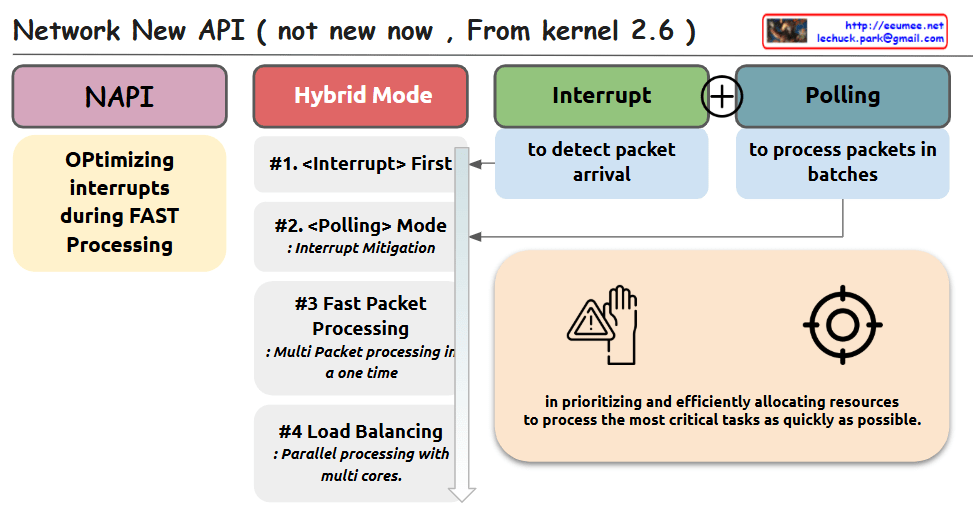
NAPI

This image shows a diagram of the Network New API (NAPI) introduced in Linux kernel 2.6. The diagram outlines the key components and concepts of NAPI with the following elements:

The diagram is organized into several sections:

  1. NAPI – The main concept is highlighted in a purple box
  2. Hybrid Mode – In a red box, showing the combination of interrupt and polling mechanisms
  3. Interrupt – In a green box, described as “to detect packet arrival”
  4. Polling – In a blue box, described as “to process packets in batches”

The Hybrid Mode section details four key features:

  1. <Interrupt> First – For initial packet detection
  2. <Polling> Mode – For interrupt mitigation
  3. Fast Packet Processing – For multi-packet processing in one time
  4. Load Balancing – For parallel processing with multiple cores

On the left, there’s a yellow box explaining “Optimizing interrupts during FAST Processing”

The bottom right contains additional information about prioritizing and efficiently allocating resources to process critical tasks quickly, accompanied by warning/hand and target icons.

The diagram illustrates how NAPI combines interrupt-driven and polling mechanisms to efficiently handle network packet processing in Linux.

With Claude

IO_uring

This image explains IO_uring, an asynchronous I/O framework for Linux. Let me break down its key components and features:

  1. IO_uring Main Use Cases:
  • High-Performance Databases
  • High-Speed Network Applications
  • File Processing Systems
  1. Core Components:
  • Submission Queue (SQ): Where user applications submit requests like “read this file” or “send this network packet”
  • Completion Queue (CQ): Where the kernel places the results after finishing a task
  • Shared Memory: A shared region between user space and kernel space
  1. Key Features:
  • Low Latency without copying
  • High Throughput
  • Efficient Communication with the Kernel
  1. How it Works:
  • Operates as an asynchronous I/O framework
  • User space communicates with kernel space through submission and completion queues
  • Uses shared memory to minimize data copying
  • Provides a modern interface for asynchronous I/O operations

The diagram shows the flow between user space and kernel space, with shared memory acting as an intermediary. This design allows for efficient I/O handling, particularly beneficial for applications requiring high performance and low latency.

The framework represents a significant improvement in Linux I/O handling, providing a more efficient way to handle I/O operations compared to traditional methods. It’s particularly valuable for applications that need to handle multiple I/O operations simultaneously while maintaining high performance.

With Claude

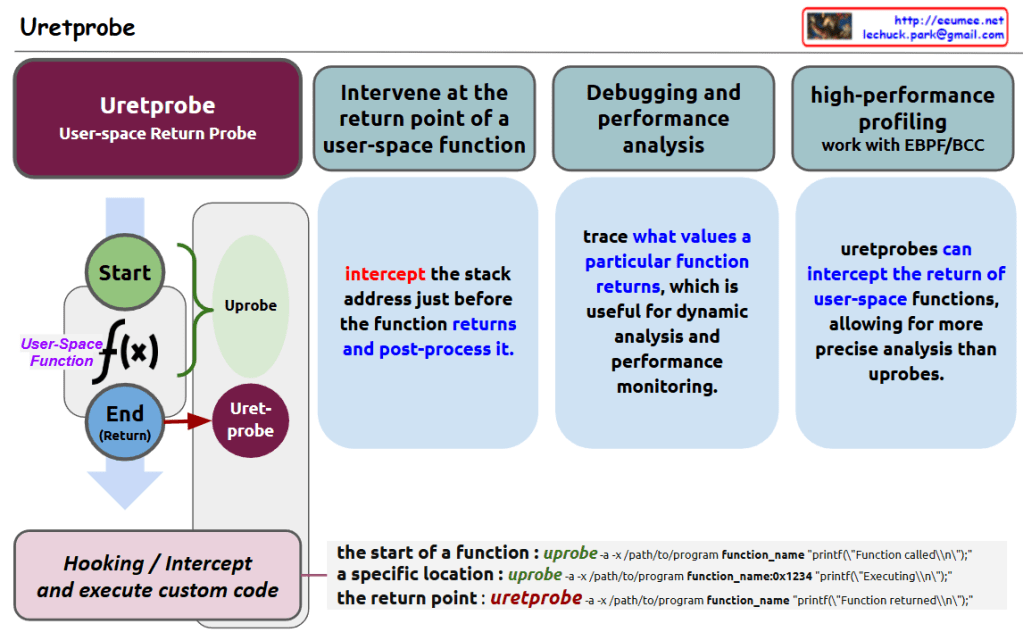
Uretprobe

Here’s a summary of Uretprobe, a Linux kernel tracing/debugging tool:

  1. Overview:
  • Uretprobe is a user-space return probe tool designed to monitor function returns in user space
  • It can track the execution flow from function start to end/return points
  1. Key Features:
  • Ability to intervene at the return point of user-space functions
  • Intercepts the stack address just before function returns and enables post-processing
  • Supports debugging and performance analysis capabilities
  • Can trace specific function return values for dynamic analysis and performance monitoring
  1. Advantages:
  • Provides more precise analysis compared to uprobes
  • Can be integrated with eBPF/BCC for high-performance profiling

The main benefit of Uretprobe lies in its ability to intercept user-space operations and perform additional code analysis, enabling deeper insights into program behavior and performance characteristics.

Similar tracing/debugging mechanisms include:

  • Kprobes (Kernel Probes)
  • Kretprobes (Kernel Return Probes)
  • DTrace
  • SystemTap
  • Ftrace
  • Perf
  • LTTng (Linux Trace Toolkit Next Generation)
  • BPF (Berkeley Packet Filter) based tools
  • Dynamic Probes (DynProbes)
  • USDT (User Statically-Defined Tracing)

These tools form part of the Linux observability and performance analysis ecosystem, each offering unique capabilities for system and application monitoring.