From Claude with some prompting
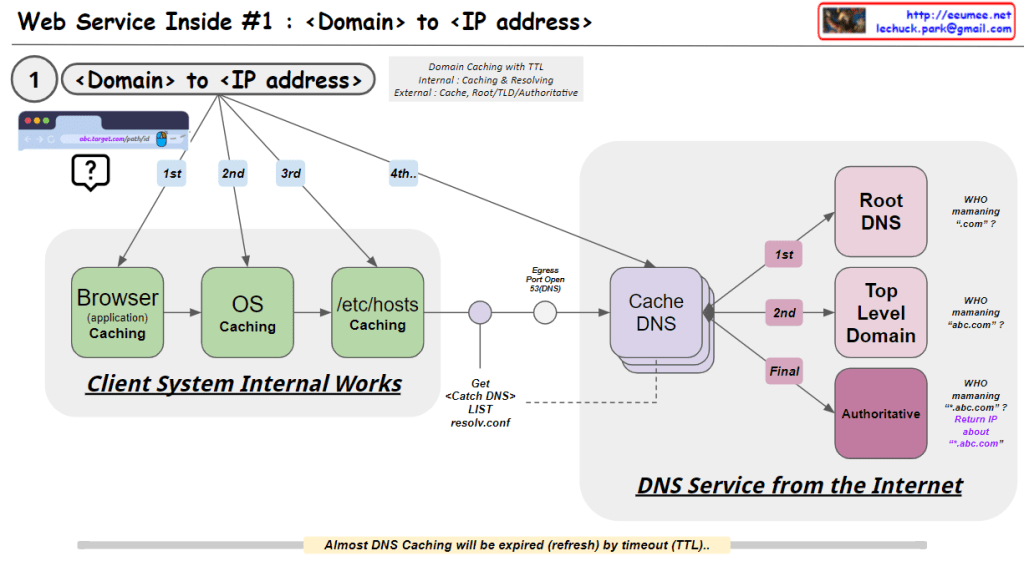
This image illustrates the process of converting a domain name to an IP address, which is the first step in web service operations. Here’s a breakdown of the image:
- Client System Internal Works:
- Browser (application) Caching: The first level of caching occurs in the web browser.
- OS Caching: The second level of caching is at the operating system level.
- /etc/hosts Caching: The third level involves checking the local hosts file.
- DNS Service from the Internet:
- Cache DNS: This is the first point of contact with external DNS services.
- Root DNS: Manages top-level domains like “.com”.
- Top Level Domain: Manages specific top-level domains (e.g., “.com”, “.org”).
- Authoritative DNS: Provides the final, authoritative IP address for the specific domain.
The process follows a hierarchical order:
- Check Browser cache
- Check OS cache
- Check /etc/hosts file
- Query Cache DNS server
- If not found, Cache DNS queries Root DNS
- Then queries Top Level Domain
- Finally queries Authoritative DNS to get the IP address
The image also notes:
- DNS caching uses TTL (Time To Live) for expiration.
- The system uses a resolve.conf file to get the Cache DNS list.
- It questions who is managing various levels of DNS (“.com”, “abc.com”, etc.)
This process ensures efficient and hierarchical resolution of domain names to IP addresses, utilizing various caching mechanisms to improve speed and reduce network load.

 Lechuck Park