From Claude with some prompting
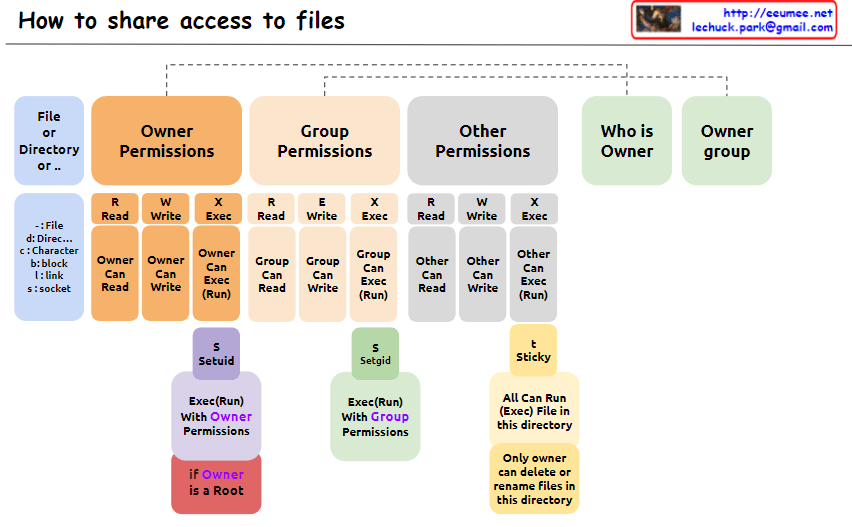
The image explains “How to share access to files” in Unix/Linux systems, illustrating the structure of file permissions. The diagram breaks down permissions into owner, group, and other categories, along with special permissions and metadata.
- File Permissions Structure: The image depicts how access rights to files or directories are shared in Unix/Linux systems. Permissions are divided into owner, group, and other users.
- Owner Permissions:
- Read (R): Owner can read the file.
- Write (W): Owner can modify the file.
- Execute (X): Owner can execute the file.
- Group Permissions:
- Read (R): Group members can read the file.
- Write (W): Group members can modify the file.
- Execute (X): Group members can execute the file.
- Other Permissions:
- Read (R): Other users can read the file.
- Write (W): Other users can modify the file.
- Execute (X): Other users can execute the file.
- Metadata:
- Who is Owner: Indicates who owns the file or directory.
- Owner group: Shows which group the file or directory belongs to.
- Special Permissions: a. SetUID (S):
- Executes with the file owner’s permissions.
- Useful when a regular user runs the
passwdcommand owned by root.
- Executes with the file group’s permissions.
- Beneficial for group collaboration; new files can inherit the parent directory’s group.
- “Only owner can delete or rename files in this directory”
- When set on a directory, files within it can only be deleted or renamed by the file’s owner, directory owner, or root.
- Commonly used in shared directories like
/tmpto prevent users from unauthorized deletion or renaming of each other’s files.
- Additional Information:
- “if Owner is a Root”: When the owner is the root user, special privileges are granted. Root has all permissions on every file and directory, enabling any system administration task.
This image provides a clear and visual explanation of the file permission system in Unix/Linux. Notably, the description of the Sticky bit has been corrected to accurately reflect its function: “Only owner can delete or rename files in this directory”. This correction properly conveys that while execution and modification of files in a Sticky directory are governed by individual file permissions, the ability to delete or rename files is restricted to the file owner, directory owner, or root.
This permission system effectively manages security and accessibility in multi-user environments. It allows fine-grained control over who can read, write, or execute files, and in the case of the Sticky bit, who can delete or rename files in shared spaces. Such granular control is crucial for maintaining data integrity, privacy, and orderly collaboration among users on a Unix/Linux system.

 Lechuck Park